Agentic Work
TensorSharp.AgentHost turns a local model response into a bounded generate → inspect → run → repair → answer loop. It can load Agent Skills only when they are needed, work with files through four built-in code tools, run checks inside an OS sandbox, hand independent parts of a server request to bounded sub-agents, and return finished artifacts to an ordinary CLI, Web UI, Ollama, or OpenAI client.
What happens in one turn
Advertise capabilities cheaply
TensorSharp puts only each reachable skill's name and description in the prompt. A selected skill is preferred and made reachable; selection does not load its instructions.
Load instructions on demand
When a tool-capable model decides a skill applies, it calls
skills_read(skill, "SKILL.md"). TensorSharp answers that built-in call in process, appends the result to the same conversation, and generates again.Do the work
If the operator enabled
--code-exec, the model can inspect, edit, create, patch, and test files in a request or chat workspace. Skill scripts can participate too, but only under their separate execution opt-in.Return an ordinary answer
The client receives the final completion rather than TensorSharp's internal tool calls. A caller's own tools are never executed by TensorSharp; those calls are returned normally for the caller to service.
One loaded model, in-process tools, and bounded sub-agents. On the server's chat paths a tool-capable model can also delegate independent work to sub-agents that run on the same loaded model; the CLI runs a single agent. There is no interactive approval queue before each command. The operator grants or withholds skills, script execution, code execution, networking, and installation when the CLI or server starts; an internal tool then runs under that policy or refuses.
TensorAgent: one app, different kinds of work
TensorAgent is the local .NET MAUI app built on TensorSharp's engine, chat pipeline and AgentHost. It targets iPhone/iPad, Mac Catalyst and Windows WinUI. Use the desktop download, installation and user guide for macOS and Windows distribution packages; iPhone/iPad remains a source build. The CLI/server archives and NuGet packages do not install the app.
| Work | What the app provides |
|---|---|
| Text and multimodal chat | Local answers, reasoning and tools with supported text models; photos, video, audio and files according to the loaded model's capabilities. |
| Personal knowledge bases | Import files, nested folders and saved chats; select collections per chat, retrieve located evidence and open retained originals. Document extraction, PDF OCR, derived media text and optional semantic retrieval each have coverage limits. Knowledge guide → |
| Image generation and editing | Qwen-Image 2.1 generates from a description, edits one photo with optional references, and supports a painted selection that preserves pixels outside it. Compare the result or edit again; the base entry offers fourteen LoRA plug-ins, including four speed adapters. Turbo uses its fixed 8-step recipe and offers only compatible style/edit adapters. The base and Turbo AD-Q4_K entries need the 24 GB tier; Turbo Q8_0 needs 32 GB. |
| Video with sound | MiniMax-H3 makes short clips and a soundtrack from text, keyframes or references; TensorAgent's Apple media provider includes the audio in the MP4. Its keyframes entry offers two optional speed plug-ins, LightX2V Turbo 8-Step and 4-Step (1.38 GB each), applied per clip in chat and in Studio; the 4-step schedule is inferred, and no app timings with them are recorded yet. The catalog requires the 32 GB tier. Windows audio/video generation has not been validated. |
| Files, code and browser work | Skills, workspace file tools, command execution and bounded sub-agents can create downloadable artifacts. Desktop builds include the Playwright browser skill. iOS uses embedded runtimes and cannot launch a browser process; desktop command and network access follow the Sandbox settings. |
The interface, native screens and share extension support English, Simplified Chinese, Traditional Chinese, Japanese, Korean, Spanish, French and German. Settings → Language overrides the system language. This changes the interface, while the loaded model determines the languages it can understand and produce.
Press Enter to send and Shift+Enter for a new line on a hardware keyboard. Completed text turns show token count, elapsed time and throughput; image and video turns show denoising progress.
Send a new instruction during generation to steer the reply: the active generation is interrupted, produced text remains, and the new instruction runs after cleanup. Knowledge bases and response steering require a build after v2026.10.10. Usage guide →
TensorAgent on iPhone and iPad
TensorAgent packages this local chat and agent experience as a .NET MAUI iOS/iPadOS app. The engine is statically linked as an iOS .xcframework and uses ggml_metal on physical devices, with ggml_cpu as the alternative there and the only backend in the simulator; MLX is not built for iOS. The app shares the host-neutral chat pipeline (TensorSharp.Chat) with the server, but serves the UI through an in-process loopback server because iOS has no ASP.NET Core runtime pack. What it shares is the API, not the document: the phone gets its own page, laid out for a thumb rather than a mouse and a wide window, bound to the same WebUiChatService and SkillsService routes.
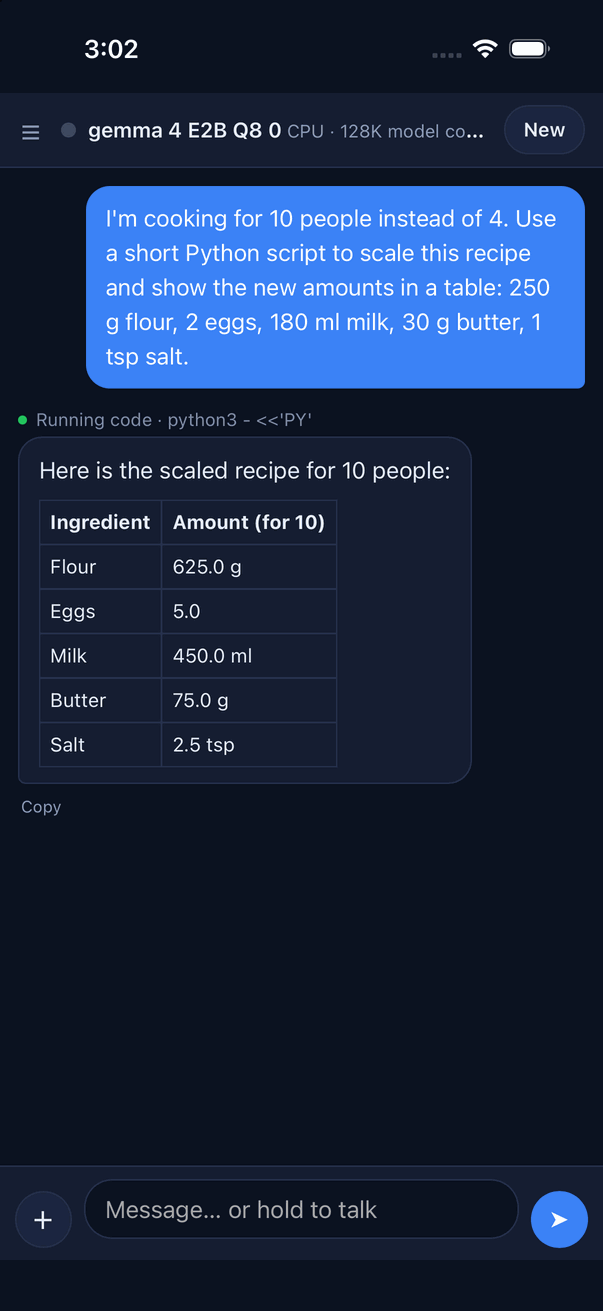
ggml_cpu there; on an iPhone it uses ggml_metal. The model wrote a short script, ran it in the app's built-in Python, and answered with the table.Models download to the device with resume and SHA-256 verification; conversations survive app restarts; photos, camera, video, files, and dictation use the same chat attachment flow. Since iOS cannot start child processes, TensorAgent's shell, Python, and JavaScript integrations are runtime-backed and report their limits explicitly.
Three constraints a phone imposes that a desktop does not, and what the app does about each:
| Constraint | What the app does |
|---|---|
| The screen goes away mid-answer | Generation belongs to a host-side manager, not to the WebView — WebKit suspends a page whose view left the window. A turn keeps running while you move to another screen in the app. When the app leaves the foreground the engine pauses between steps, because iOS forbids GPU work in the background; the turn keeps its place and its cache, resumes when the app is active again, and the page re-attaches to it. |
| The first message of a launch pays for the whole shared prefix | The state at the end of the prompt every chat shares is checkpointed to disk per model and restored at admission on the next launch. Measured on iPhone 17 Pro Max with Qwen3.5 9B: a 54 s cold first message becomes a 1.2 s warm-up and a ~0.6 s first message. |
| iOS jetsam kills without a stack or a message | The engine's memory policy is sized against what jetsam charges — wired file pages count against the device, not the process — so caches start small and grow, a request reserves a bounded reply, and a memory warning releases what only serves the next request's speed. |
The app targets iPhone and iPad (arm64, iOS 17.0 or later). It uses the scene lifecycle, which a build against the iOS 27 SDK needs in order to launch; the recorded physical-device runs are on iOS 26.6.1. Its built-in catalog — Gemma 4 E2B, E4B and 12B and Qwen3.5 9B — is offered on devices in the 12 GB memory tier and above; the experimental Bonsai 2 27B needs the 16 GB tier (iPads and Macs). Several behaviors differ from the desktop hosts:
- Speculative decoding is on by default — a draft head for Gemma 4 E4B and 12B when one was downloaded, n-gram lookup otherwise where the model supports speculation. Changing the setting applies to the running engine from the next reply.
- Sub-agent delegation is on by default, with a switch (see below). Settings > Sandbox > "Sub-agents" turns it off from the next message, withholding the coordination tools as
--no-multi-agentdoes; the limits stay at the host defaults, and the phone page shows no sub-agent panel. - Generated files open in Quick Look, with the share sheet as the fallback.
- An “Ask TensorAgent” share extension brings a web page, photo, file, or text from another app into a chat, with presets such as Summarize, Key points, and Translate.
The same AgentAppHost also runs on macOS, Linux, and Windows. There, AgentExecutionMode.Auto (or Process) runs commands and skill scripts as native processes under the desktop OS sandbox instead of the embedded runtimes. When a networkHosts allow-list is set, that desktop backend refuses network-enabled launches rather than broadening access it cannot enforce.
TensorAgent on the Mac and Windows
Install on macOS · Install on Windows · Choose your first model · Set up code and browser tools
The same project builds desktop TensorAgent for Mac Catalyst and Windows WinUI, sharing the page, conversations, skills and searchable model families. The current catalog has 39 entries, including larger Gemma/Qwen, Muse-Glimmer, GPT OSS, Nemotron, Mistral, Hunyuan, DiffusionGemma, DeepSeek and GLM checkpoints, Qwen-Image 2.1/Turbo, LTX 2.5 Distilled and the two MiniMax-H3 checkpoints. System-memory tiers determine eligibility; many additions remain experimental. Metadata, hash and capacity checks do not validate inference on every model/device. Qwen-Image 2.1 Turbo offers fixed 8-step AD-Q4_K (24 GB) and Q8_0 (32 GB) entries. Qwen3.8 Flash Next offers UD-Q2_K_XL at 48 GB and experimental UD-IQ1_M at 32 GB, reading mapped n-gram/expert weights on demand; actual performance depends on memory, GPU and SSD.
The engine is the desktop GgmlOps library (ggml_metal on a Mac; CUDA or Vulkan on Windows when the engine has them and the machine can run them). The model's code runs as real bash, python3, node and browser processes, confined by Seatbelt on the Mac and, on Windows, run only after Run without a sandbox is turned on, because Windows cannot confine them; so every skill ships, the Playwright skill included. The engine follows catalog cache budgets (lean-cache entries use conservative allocations; an earlier Qwen3.8 27B measurement held app memory at 8.8 GB instead of 18.8 GB), and a generation keeps running behind other windows, with App Nap and idle sleep held off while the model works. On an M5 Pro with Gemma 4 E2B the Mac app decodes within 3% of the same host code on CoreCLR, and a turn's first token arrives about 60 ms later, because .NET runs Mac Catalyst apps on Mono. Windows Debug and Release builds ran on Windows x64 with an RTX 3080 Laptop on 2026-10-01: chat, files, code tools, a synthetic vision turn, cancellation and conversation recovery were checked. This does not cover catalog downloads, native pickers, audio/video generation, every model/backend or a long soak. See the TensorAgent README for the exact coverage and explicit skips.
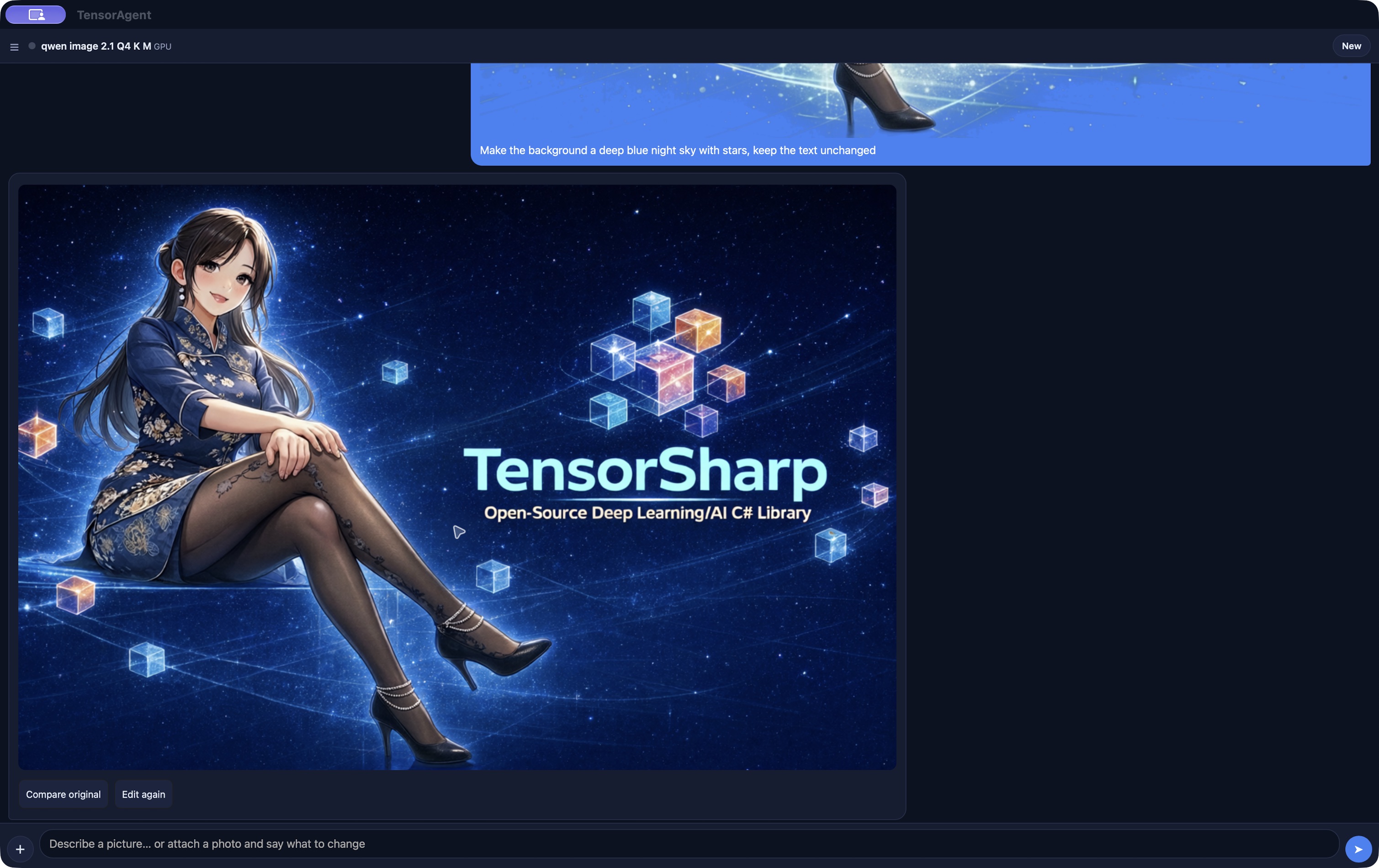
ggml_metal in the native Mac app, on an Apple M5 Pro with 48 GB memory. A saved image-edit conversation changes the banner’s background to a deep blue night sky with stars while keeping the text. Compare original and Edit again let the user review and continue the edit. Captured from the current Release app on 2026-10-02; this capture is not a new inference timing measurement.See the TensorAgent README for build, simulator, device, desktop, and verification instructions.
Agent Skills and progressive disclosure
A skill is a directory containing a required SKILL.md plus any scripts, references, and assets its instructions need. TensorSharp follows the Agent Skills specification and can load published skill repositories without rewriting their layout.
pdf/
├── SKILL.md
├── scripts/
│   └── extract_tables.py
├── references/
│   └── forms.md
└── assets/
└── template.pdf| Tier | What reaches the model | When |
|---|---|---|
| Metadata | name + description | Up front for selected and discoverable skills. This is the normal prompt cost. |
| Instructions | The complete SKILL.md body | Only after the model activates it with skills_read(skill, "SKILL.md"). |
| Bundled files | References, scripts, and assets | Paths and sizes are indexed; content is fetched only through skills_read, paged at 48 KB. |
The normal metadata block uses about 2% of the context window, clamped to roughly 1,024–10,000 tokens. The old behavior that inlined every selected body is off by default. A model family that cannot carry and parse tool declarations has no opportunity to call skills_read, so TensorSharp instead inlines selected skill bodies within a bounded fallback budget and does not advertise skills it cannot load.
The base skill tools are skills_list and skills_read. skills_run appears with --skills-allow-exec; native discovery/installation tools have separate conditions below. Script execution is off by default and remains separate from model-authored code execution.
Where skills come from
--skills-dir (repeatable) or TS_SKILLS_DIR names the roots explicitly. Without either, the CLI and server search every existing .agents/skills directory from the working directory up to the Git repository root, nearest first (outside a repository, only the working directory), plus the skills folder beside the binary, which is created if it is missing. The CLI searches that folder last. On the server it is also the upload directory, so it is always scanned, and scanned first: an uploaded skill wins a name clash, and it stays in the list even when --skills-dir or TS_SKILLS_DIR replaces the .agents/skills defaults. Personal or global skill folders are never imported implicitly.
Discover, inspect and install community skills
The bundled find-skills uses shared .NET tools to search skills.sh, inspect public GitHub packages and install their inspected immutable commit. Discovery/installation needs no Node, Git or child process. Enable Network in TensorAgent or --skills-allow-network on the server; find-skills must also be reachable in the current request. An explicit empty skill selection disables these tools.
| Tool | Behavior |
|---|---|
skills_search(query, owner?) | Returns package identifiers, sources, links and install counts; counts do not prove quality. |
skills_inspect(package) | Retrieves instructions, compatibility, license and files at an immutable commit without running repository code. |
skills_install(package, revision?) | Installs only the revision inspected in this request, without overwriting an existing skill; needs a writable host installation directory. |
Packages use owner/repository@manifest-name. The server and TensorAgent configure writable registries; the default CLI registry is read-only and offers search/inspection. The installing request sees the skill immediately, other active requests retain their scope, and later requests discover it normally. Installation does not enable code/script execution or satisfy missing external dependencies.
The shared bundle now has 17 packs, including new find-skills, grill-me, grill-with-docs, tdd and handoff. Static checks classify 15 as compatible with the in-process mobile host; playwright and web-artifacts-builder are excluded from its catalog. Static compatibility and installation are not model-quality passes: controlled macOS Metal workflows with Gemma 4 E4B Q8 passed 3/4 complete tasks, with an HTML button-semantics failure. They establish no native-GUI, Windows or physical-iOS workflow result. Protocol, provenance and validation limits →
Four code tools, off by default
--code-exec adds a patch-first coding surface. It does not require a skill, and merely installing or selecting a skill does not turn it on.
| Tool | Purpose | Important bound |
|---|---|---|
read_file | Read real workspace bytes with line numbers. | Bounded output; paths stay inside the workspace. |
write_file | Create a new file. | Confined to the workspace; an existing path is refused, so existing files change through apply_patch. |
apply_patch | Modify one file or multiple files by anchored hunks, including a single-line change; also create, rename, or delete files. | Atomic: all hunks apply or none do. |
shell | Run tests, commands, and generated programs. | Timeout and output caps; sandbox-or-refuse on supported hosts. |
Failures are designed to be repairable. A diagnostic that identifies a regular source file in the workspace returns a bounded source excerpt and asks for the smallest apply_patch change before rerunning. Syntax checks, missing-import installation when allowed, and installed-library API hints reduce avoidable model rounds.
Workspace lifetime and artifacts
| Surface | Workspace lifetime | Result |
|---|---|---|
| CLI / interactive chat | Persistent for the process or chat session. | One tool call can inspect or repair files written by an earlier call. |
| Bundled Web UI | Persistent for that Web chat session. | Live writing/running activity, bounded output, and generated-file download chips. |
| OpenAI and Ollama HTTP chat | One private workspace across every internal tool round in that request; deleted when the response finishes. | Repairs work within a request, while separate requests remain stateless. |
skills_run without code execution | Fresh per-call scratch directory, deleted on return. | Scripts do not accidentally share state. |
When code execution is enabled, a skill script shares the same request/chat workspace as the four code tools. The server copies produced files into its bounded artifact store; the Web UI exposes safe download links, and artifact responses are sent as attachments with content sniffing disabled.
Sandbox-or-refuse security model
Enabling execution is an operator decision, not a request field. On macOS and Linux, model-authored commands and opted-in skill scripts run with a workspace write boundary, an unreadable home directory, a scrubbed environment, and network denied by default. Paths are also checked in process before the OS sandbox is entered.
| Platform | Model-authored code | Skill scripts |
|---|---|---|
| macOS | sandbox-exec; refuses if confinement is unavailable. | Default --skills-sandbox required; sandboxed or refused. |
| Linux | Requires bwrap 0.12.0 or newer; otherwise refuses. | The same safe bwrap requirement under the default required mode. |
| Windows | No filesystem/network sandbox is implemented. --code-exec-unconfined is required and intentionally grants the process's file and network reach. | A job object bounds the process tree but not files or sockets. Default required refuses; --skills-sandbox preferred is the explicit weaker opt-in. |
Sandboxed does not mean a disposable VM. macOS deliberately retains access to shared /private/tmp and the per-user Darwin temp directory for compatibility, plus some local Unix IPC. Seatbelt restrictions pass to children and ordinary process groups are stopped, but a deliberately detached child can outlive the request; every tool result reports that gap. Linux shares parts of the host network namespace even while IP networking is denied. Every reported platform gap matters. Do not enable unconfined execution on a server other people can reach.
Network and package installation are separate opt-ins
| Option | Default | What it grants |
|---|---|---|
--code-exec-allow-network | Off | Unrestricted host IP networking for every model-authored command, including LAN/loopback services. It is not domain-filtered. |
--skills-allow-network | Off | Network for opted-in bundled skill scripts only. It does not affect shell. |
--code-exec-allow-install | Off | Host-performed recognized pip/npm installs. The host reads and validates package names, uses prebuilt wheels / disabled npm scripts, and removes the install from the model's command. |
--code-exec-packages, --code-exec-install-index, and --code-exec-install-domains constrain the host installer. They are not a security boundary after unrestricted command networking is enabled, because generated code can download an artifact directly. The script and code network switches are intentionally independent.
Browser automation: the Playwright skill
Browser “computer use” is a skill, not a runtime feature: there is no screen or mouse tool and no browser bridge. The playwright bundle in TensorAgent/skills drives a real browser through skills_run and a wrapper script that runs a pinned @playwright/cli with npx. Its instructions cover navigation, form filling, snapshots, screenshots, and data extraction, asking the user for missing information, and handing a headed persistent browser to the user for a login or CAPTCHA.
dotnet run --project TensorSharp.Server.Host -c Release -- \
  --model models/model.gguf --backend ggml_metal --host 127.0.0.1 \
  --skills-dir ./TensorAgent/skills \
  --skills-allow-exec --skills-allow-network \
  --code-exec --code-exec-allow-install --code-exec-allow-network
Besides those opt-ins it needs real Node.js, npm, and npx on the host. On macOS the skill has the model create .playwright/cli.config.json with write_file to turn off Chromium's own sandbox, because a process already confined by Seatbelt cannot start a second one; the outer Seatbelt sandbox stays on. Recorded model-driven workflows are on macOS arm64. Windows has a separate real skill-runner probe against a synthetic local login form for native Node wrappers, browser/session lifetime and cleanup; that bounded integration does not establish authenticated live-site or model-driven success. Linux browser workflows remain unqualified. It is left out of the iOS app bundle, because iOS has no child processes or Node.js; TensorAgent/skills keeps it for the desktop hosts. Setup, account handoff, and recorded runs are in docs/playwright_agent.md.
Start an agentic session
Skills can be used without executing code:
dotnet run --project TensorSharp.Cli -c Release -- \
  --model models/model.gguf --backend ggml_metal \
  --skills-dir ./skills --skill pdf -i
Add the four code tools explicitly. This example keeps both command networking and package installation off:
dotnet run --project TensorSharp.Cli -c Release -- \
  --model models/model.gguf --backend ggml_metal \
  --skills-dir ./skills --skill pdf --code-exec -i
Or host the same loop for the Web UI and compatible APIs:
dotnet run --project TensorSharp.Server.Host -c Release -- \
  --model models/model.gguf --backend ggml_cuda \
  --skills-dir ./skills --code-exec

# Browser UI: http://localhost:5000/
# Liveness:   http://localhost:5000/health
On Linux, install bwrap 0.12.0 or newer first. On Windows, code execution remains unavailable unless the operator deliberately adds --code-exec-unconfined. Do not copy that Windows escape hatch onto a shared server.
Use skills from an ordinary HTTP client
The server must be started with a skills registry. A client then selects skills on the normal chat request; TensorSharp services its own skill/code calls internally and returns the completed response.
{
  "model": "local",
  "messages": [
    { "role": "user", "content": "Extract the tables and summarize the findings." }
  ],
  "skills": ["pdf"],
  "skills_discovery": false,
  "stream": true
}
skills_discovery defaults to true. Code execution has no per-request enable field: the operator either started the host with --code-exec or the four tools are absent. The agent loop allows 8 internal rounds by default, or 24 when code execution is enabled; --skills-max-rounds sets an explicit 1–64 bound.
Sub-agents: bounded delegation
On the server's chat paths — OpenAI /v1/chat/completions and /v1/responses, Ollama /api/chat/ollama, and the Web UI's /api/chat — a tool-capable model can hand independent parts of a request to sub-agents and combine their reports into one answer. Delegation is on by default, and the model decides whether to use it; nothing forces a spawn. It needs neither skills nor --code-exec: the five coordination tools are offered on their own.
| Tool | Behavior |
|---|---|
spawn_agent(task_name, task, agent_type?) | Starts a child and returns its ID immediately. agent_type is explorer (the default), reviewer, or worker. |
wait_agent(agent_id?, timeout_ms?) | Waits for one direct child, or for all of them when the ID is omitted: 10,000 ms by default, 60,000 ms at most. A timeout is not completion. |
send_input(agent_id, message) | Queues a follow-up for a running child at its next generation boundary, or starts another turn on a completed one. |
close_agent(agent_id) | Cancels a child and its descendants. |
list_agents() | Reports the direct children and their status. |
Every child runs on the same loaded model with the parent's token limit, thinking mode, and sampling. It starts from the parent's system/developer instructions and its own self-contained task, not the parent's transcript or attachments, and it returns a bounded report. explorer and reviewer children are always read-only: besides the five coordination tools (so a child can delegate further, within --agents-max-depth), they get skills_list, skills_read, and read_file when the parent has it. A worker is read-only too unless the server was started with --agents-allow-worker-tools and its parent is the root or another mutable worker; it then gets the parent's enabled mutable tools, so delegation never widens permissions. A mutable worker shares the parent's workspace and sandbox, and read-only children read that same workspace; there are no Git worktrees or merging. Caller-owned tools are never passed to a child, and host tool calls anywhere in one request's tree run one at a time. Each child gets its own copy of the KV state rather than shared pages. Before the parent prefills, the host checkpoints the prefix it shares with its children, so a child can restore that prefix instead of computing it again.
| Server option | Default | Range and meaning |
|---|---|---|
--no-multi-agent | Delegation on | Turns delegation off. TS_NO_MULTI_AGENT set to any value other than 0 does the same. |
--agents-max-concurrent | 3 | 1–32 active descendants, not counting the root |
--agents-max-count | 8 | 1–128 children per request tree |
--agents-max-depth | 2 | 1–8 levels below the root |
--agents-max-rounds | 8 | 1–64 tool rounds per child turn |
--agents-max-generations | 48 | 1–1024 child generations per request |
--agents-timeout | 180 s | 1–3600 seconds per child run |
--agents-max-result-chars | 8000 | 256–64000 characters per report |
--agents-allow-worker-tools | Off | Lets worker children use the parent's enabled mutable tools |
A request can opt out with "multi_agent": false. It cannot turn delegation on when the host has turned it off, raise a limit, or enable worker tools. While wait_agent runs, the Web UI's activity row carries an expandable panel with a live card for each sub-agent (task, status, current tool, result). OpenAI and Ollama responses carry only the parent's text. The CLI and Ollama /api/generate do not delegate. TensorAgent uses the host's default limits and has a "Sub-agents" switch in Settings (on by default) that turns delegation off from the next message.
The tools are offered only to families that render tool declarations and parse tool calls — not Mistral 3, Hunyuan Dense, or DiffusionGemma — and never on structured-output requests. There is no model-size gate. No latency, quality, or delegation-rate measurements are published. Delegation spends extra tokens and context, and whether it helps depends on the workload. Details: docs/multi_agent.md.
Model-family limits
The in-process loop requires a model family that can both carry tool declarations and parse tool calls. Families without that round trip receive selected skill instructions inline as a fallback, but are not offered the four code tools or the sub-agent tools; among the supported families that is Mistral 3, Hunyuan Dense, and DiffusionGemma. Qwen 3.8 Flash Next now completes the round trip. TensorSharp logs the limitation rather than silently pretending code execution is available.