Server & Web UI
TensorSharp.Server.Host (built on the TensorSharp.Server library) is an ASP.NET Core app that hosts a single GGUF model and exposes a browser chat UI plus Ollama- and OpenAI-compatible REST APIs on the same port. The continuous-batching engine handles concurrency.
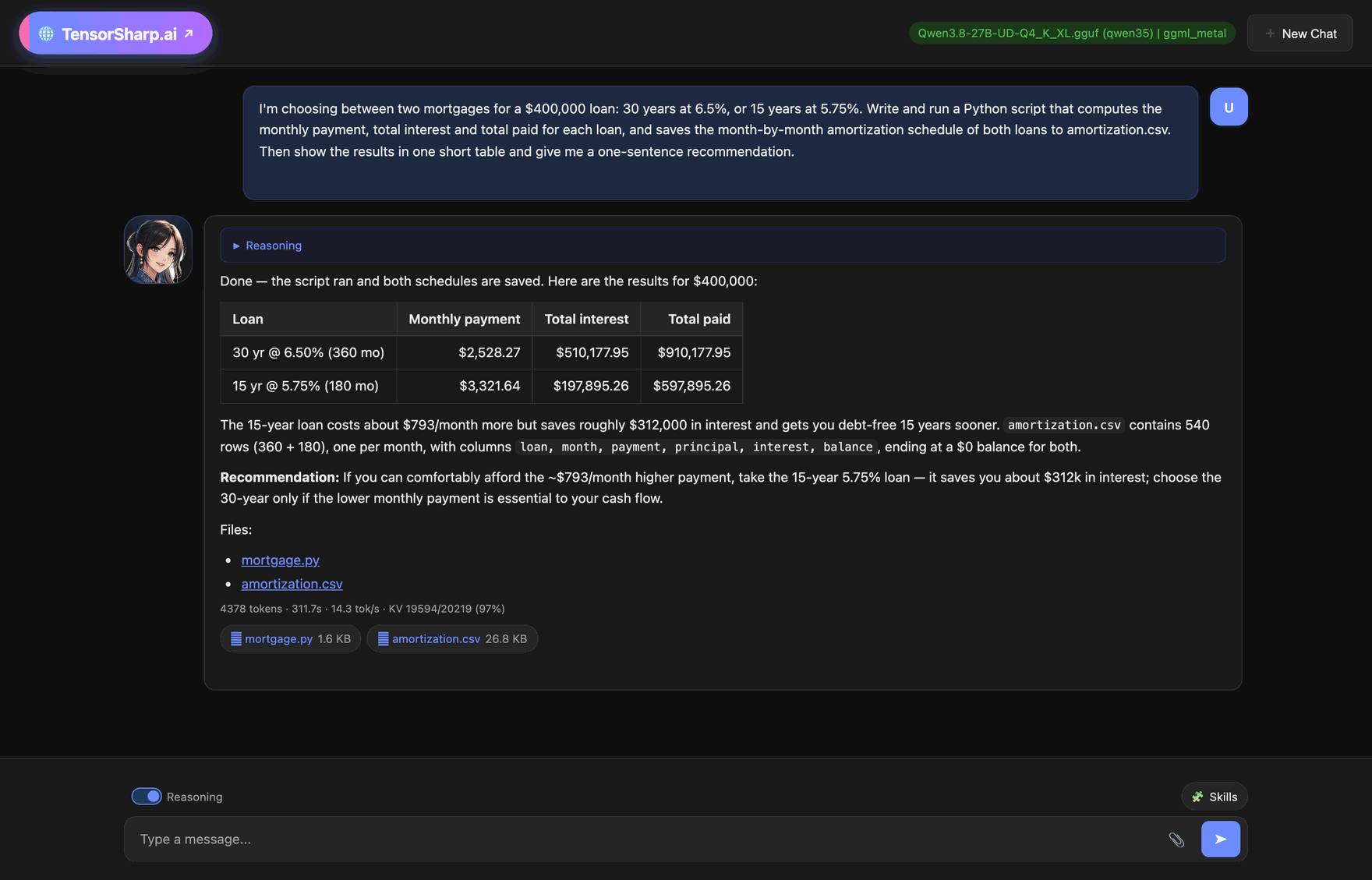
ggml_metal, started with --code-exec, on an Apple M5 Pro. The model wrote a Python script, ran it in the macOS sandbox, checked that both schedules end at a $0 balance, answered with a table, and offered the script and the 540-row CSV as downloads.Embedding service
Start with --model encoder.gguf --embeddings to host Snowflake Arctic Embed L v2.0 or MiniLM. POST /v1/embeddings and POST /api/embed return normalized vectors on pure C# cpu or native ggml_cpu / ggml_metal / ggml_cuda. Downloads, APIs, truncation, and retrieval quality →
Jev typed decisions
Host a DiffusionGemma GGUF (for example with config/jev-diffusiongemma-q4.json) and POST /v1/systemone answers Jev-compatible typed-decision requests: the body carries state and typed questions (noul, choice, score), and the reply carries probabilities, choices and expected scores read after one denoising step. model may name the loaded model or the aliases jev-latest / jev-preview, which are not separate checkpoints. Requests are JSON only; with the vision tower loaded through --mmproj, a request may also carry up to 8 inline images (base64 or data: URLs) in its images array. TS_JEV_MAX_BODY_MB (default 8, 1–64), TS_JEV_MAX_CANVAS (default 64, 8–4096) and TS_JEV_MAX_PENDING (default 32 admitted requests, 1–1024) bound the work. Fields, limits and status codes →
Start the server
Quick start in ~30 seconds (Gemma 4 E4B)
Install the .NET 10 SDK for your platform, Git, CMake, and curl, then paste this from a terminal. Copying and running the commands takes about 30 seconds; the 7.48 GiB model download and the first restore/build take longer and depend on your connection and machine. It hosts the repository's benchmark-verified Gemma 4 E4B Q8_0 from the recommended public ggml-org artifact on the native GGML bridge. This block is for Linux + NVIDIA (the CUDA build also needs the CUDA Toolkit):
git clone https://github.com/zhongkaifu/TensorSharp.git
cd TensorSharp
TENSORSHARP_GGML_NATIVE_ENABLE_CUDA=ON dotnet build TensorSharp.slnx -c Release -p:TensorSharpSkipMlxNative=true
curl --create-dirs --fail -L "https://huggingface.co/ggml-org/gemma-4-E4B-it-GGUF/resolve/main/gemma-4-E4B-it-Q8_0.gguf?download=true" -o models/gemma-4-E4B-it-Q8_0.gguf
dotnet run --project TensorSharp.Server.Host -c Release --no-build -- --model models/gemma-4-E4B-it-Q8_0.gguf --backend ggml_cuda
On Apple Silicon, omit the CUDA environment assignment and use ggml_metal; on a supported Windows/Linux Vulkan GPU, request TENSORSHARP_GGML_NATIVE_ENABLE_VULKAN=ON instead and use ggml_vulkan; with no supported GPU, drop the assignment and use ggml_cpu. The lower-memory gemma-4-E4B-it-Q4_K_M.gguf is in the same repository. Text needs no projector; image, video, or audio also requires the matching mmproj-gemma-4-E4B-it-Q8_0.gguf passed with --mmproj. See Getting Started for Windows PowerShell and full platform syntax.
In a second terminal, verify the OpenAI-compatible endpoint:
curl -s http://localhost:5000/v1/chat/completions \
  -H "Content-Type: application/json" \
  -d '{"model":"gemma-4-E4B-it-Q8_0.gguf","messages":[{"role":"user","content":"Reply with one short hello."}],"max_tokens":32}'
The API base is http://localhost:5000. When the bundled wwwroot/ is present and enabled, GET / serves its index.html chat UI. Use GET /health for the stable plain-text liveness check; only a headless deployment with no enabled Web UI falls back to that health response at the bare / route.
--model is required for inference. The server hosts exactly the startup GGUF and optional, explicitly supplied --mmproj; it does not scan a model directory or auto-detect a projector. /api/models/load can only re-load that same startup pair, optionally on another supported backend. A model-less process cannot choose a GGUF at runtime. The default listen address is http://0.0.0.0:5000; --port, --host and --urls (env PORT / HOST / ASPNETCORE_URLS) move it.
The server has no built-in API-key authentication or TLS and binds every interface. Keep it behind a host firewall for local use, or put an authenticated HTTPS reverse proxy in front of it; do not expose port 5000 directly to an untrusted network.
Already-built source tree
Run these commands from the repository root after building. They invoke TensorSharp.Server.Host/bin/TensorSharp.Server.Host.dll; that output directory also contains the copied native libraries and wwwroot/. The Releases page also provides attached, self-contained CLI and server archives for supported platforms.
# Apple Silicon / Metal
dotnet TensorSharp.Server.Host/bin/TensorSharp.Server.Host.dll --model ./models/model.gguf --backend ggml_metal

# NVIDIA / GGML CUDA
dotnet TensorSharp.Server.Host/bin/TensorSharp.Server.Host.dll --model ./models/model.gguf --backend ggml_cuda

# AMD, Intel, or NVIDIA / Vulkan; inspect device indices first
dotnet TensorSharp.Server.Host/bin/TensorSharp.Server.Host.dll --list-gpus
dotnet TensorSharp.Server.Host/bin/TensorSharp.Server.Host.dll --model ./models/model.gguf --backend ggml_vulkan --gpu-device 1

# Multimodal: the projector is always explicit
dotnet TensorSharp.Server.Host/bin/TensorSharp.Server.Host.dll --model ./models/model.gguf --mmproj ./models/mmproj.gguf --backend ggml_cuda
Server-wide default sampling
Defaults fill in any field a request omits. Out of the box they match Ollama: temperature 0.8, top-k 40, top-p 0.9, min-p 0, repeat penalty 1.1 over the last 64 tokens, presence/frequency 0, seed -1. A parameter you set explicitly also overrides the value a client sends for it — many chat clients (VS Code Copilot Chat among them) hardcode temperature/top_p into every request. Add --sampling-precedence request to hand that control back to clients.
dotnet TensorSharp.Server.Host/bin/TensorSharp.Server.Host.dll --model ./models/model.gguf --backend ggml_metal \
    --temperature 0.7 --top-p 0.9 --top-k 40 --repeat-penalty 1.1 \
    --presence-penalty 0.0 --frequency-penalty 0.0 --seed 42 \
    --stop "</s>" --stop "<|endoftext|>"
Web UI features
Open http://localhost:5000/. The browser interface supports:
- Multi-turn chat conversations with streaming token generation (SSE).
- Answers rendered from Markdown: tables, code blocks, lists, headings and links. The page builds them as elements rather than parsing the model's text as HTML, so a reply cannot inject markup or script; a link keeps its target only for
http(s),mailtoand the server's own file downloads. - A stats line under each answer: the tokens the turn generated (reasoning and tool calls included), its wall-clock seconds, the decode speed, and how much of the prompt was served from the KV cache.
- Per-tab chat sessions — each tab owns tracked conversation history; request KV blocks and prefix reuse are owned by the inference engine.
- Image, video, audio, PDF, and text/code uploads for multimodal inference (500 MB per file by default;
--upload-max-mbchanges the per-file cap, andPOST /api/upload's request-body limit follows it upward — see the upload options below). - PDF documents: born-digital PDFs have their complete text layer extracted and inlined into the prompt; scanned PDFs fall back to page images for vision-capable models (
TS_PDF_MAX_PAGEScaps the pages read). The final rendered prompt is checked against the model's actual context window. - Thinking / reasoning mode toggle and tool calling with function definitions.
- A live activity row for agentic turns; while
wait_agentruns it offers a collapsiblewait_agent · N sub-agentslist with one card per sub-agent (task, status, current tool, result), updated in place. - Message editing and deletion with regeneration from any point in the conversation.
- DiffusionGemma denoising previews when a
diffusion-gemmaGGUF is hosted (the whole assistant message is replaced on each step, then finalized). - Qwen-Image-2.1 flow when a
qwen_imageDiT is hosted: a prompt without an attachment generates an image, and attaching one or more images edits them; live denoising previews (up to 8 frames) refresh in place until the final PNG appears with a download link. The browser sends no size, so the output uses--width/--heightwhen both are set, otherwise the model's automatic size. - Video flow when a video-generation model is hosted — MiniMax-H3 or Wan: type the prompt, attach whatever conditioning the loaded checkpoint advertises, and the browser streams per-step denoise progress over SSE until the MP4 appears with a download link. On MiniMax-H3 a 32 kHz stereo soundtrack comes back beside it, generated in the same pass. Everything numeric still comes from the startup flags — see Video generation below.
- Free scrolling — read earlier replies while new tokens stream; auto-scroll resumes at the bottom.
Selected-area image edits: attach photos, choose Select area on the editing target, save the selection and describe the change. Qwen-Image 2.1 keeps the original dimensions and protects pixels outside the selection. The result offers Compare original and Edit again; other attached photos remain references. Selection editor and mask API →
Agentic work and code execution
On tool-capable model families, the server runs the loaded model through an in-process generate → tool → generate loop. Agent Skills may be discovered and read without executing scripts; --skills-allow-exec separately opts the operator into bundled skill scripts. --code-exec opts into the host-handled read_file, write_file, apply_patch, and sandboxed shell tools. Web UI chat sessions retain a private workspace across rounds, while stateless API requests receive an isolated request workspace that is removed afterward.
The same model can also delegate: on /v1/chat/completions, /v1/responses, /api/chat/ollama and the Web UI's /api/chat, sub-agent delegation is on by default for families that render tool declarations and parse tool calls (not Mistral 3, Hunyuan Dense or DiffusionGemma). The model decides whether to call spawn_agent, wait_agent, send_input, close_agent and list_agents; it needs neither skills nor --code-exec. Each child is a separate conversation on the same model with its own copy of the KV state, and explorer and reviewer children are read-only. --no-multi-agent turns it off, the --agents-* options below bound it, and a request can opt out with "multi_agent": false. No latency or quality measurements are published for it. → Sub-agents
Executable tools are off until the operator enables them, but there is no per-command approval prompt after that decision. The default sandbox mode is required and fails closed: macOS uses Seatbelt and Linux requires bubblewrap 0.12.0 or newer. Windows Job Objects bound descendants but do not confine filesystem or network access, so skill scripts require an explicit less-safe sandbox mode and model-authored commands require --code-exec-unconfined. Host tool calls anywhere in one request's sub-agent tree run one at a time, and a worker child gets the parent's mutable tools only with --agents-allow-worker-tools. See Agentic Work, Skills & Sandboxing for the complete flags, model-family limits, workspace lifecycle, and security boundaries.
Video generation: what the UI sets, and what only the API sets
Host a video-generation model — MiniMax-H3 or Wan — and the Web UI turns into a video generator. The endpoints gate on the IVideoGenerationModel seam rather than on an architecture string, so anything else answers 400 with The loaded model is not a video-generation model. It is worth knowing exactly how little of the request the browser controls, because a video job can run for minutes or for hours and the browser gives you no way to change that mid-flight.
# MiniMax-H3: the clip and its 32 kHz stereo soundtrack, denoised together in one latent
dotnet TensorSharp.Server.Host/bin/TensorSharp.Server.Host.dll \
    --model ./models/minimax_h3_fl2va_pruned-Q4_K.gguf --backend ggml_cuda \
    --video-width 640 --video-height 384 --video-steps 20 --video-frames 22

# Same geometry, the other checkpoint: identity/appearance references into a new scene
dotnet TensorSharp.Server.Host/bin/TensorSharp.Server.Host.dll \
    --model ./models/minimax_h3_ref2va_pruned-Q4_K.gguf --backend ggml_cuda \
    --video-width 640 --video-height 384 --video-steps 20 --video-frames 22
FL2VA and Ref2VA are two checkpoints, not two settings: which one is loaded decides whether attached images are keyframes or references, and it is what /api/models reports to the browser. config/minimax-h3-fl2va.json and config/minimax-h3-ref2va.json carry the same geometry and download the denoiser, the shared Qwen3-VL-32B text encoder and both VAEs on first run — but not the tokenizer, which is not a flag: put vocab.json and merges.txt from the upstream MiniMaxAI/MiniMax-H3 processor/ folder beside the encoder, or point TS_VIDEO_TOKENIZER at the folder holding them.
The browser sends the prompt plus whatever conditioning the loaded model advertises — a first frame, a last frame, or up to maxReferenceImages reference stills alongside any attached clips and soundtracks — shaped from the video capability object that GET /api/models returns rather than guessed from an architecture name. Frame count, fps, resolution, denoise steps, seed, flow shift, sampler, negative prompt and the guidance cache are not exposed in the UI: they come from the startup flags or the model's own recipe. Guidance has no startup flag at all — the server takes no --cfg — so a request is the only place to set it, and MiniMax-H3 refuses anything above 1.0 because it ships CFG-distilled. To set any of these per request, call POST /api/video-generate or /v1/videos/generations directly.
What the process decides at startup, and how:
| What decides it | Setting | Notes |
|---|---|---|
--model (fixed for the process) | Which family, and how many denoise passes | The single biggest cost factor. MiniMax-H3 is CFG-distilled, so every step is one guidance-free pass — 20 steps by default, 4–8 as the fast operating point. A base Wan2.2-TI2V-5B runs the official 50 steps × 2 CFG passes = 100 DiT passes; a step-distilled Turbo / Lightning / FastWan checkpoint is detected from the file name and runs 4 guidance-free passes. On an M5 Pro at 1088×832 × 121 frames that is ≈3 h 30 m versus 17 m 30 s for the identical request. → H3 measurements · Wan measurements · downloads |
--video-width N / --video-height N | Default output size | The main quality lever on the server, because the Web UI sends no size of its own: without these every clip is generated at the model's default. 640×384 is the documented starting point for MiniMax-H3, and when only one of the two is given H3 takes the other from the conditioning image's aspect ratio. Aliases: --width / --height. |
--video-steps N | Default denoise steps | The quality/time trade-off after resolution. MiniMax-H3 defaults to 20; 4–8 is the fast operating point, 16–24 is visibly cleaner, past ~30 gains little. A request's steps overrides it. |
--video-mode <mode> | Default conditioning mode | Pins t2v / i2v / fl2v / ref for requests that omit videoMode. Omit it and each request infers its own mode from what it supplies, which is usually what you want; pin it for a deployment that only offers one. |
--video-frames N | Default frame count | A server-wide default, not a cap: a request that carries frames overrides it. Snapped to the model's temporal grid — 4k+1 for Wan, 17k+5 for MiniMax-H3. With the flag omitted the model recipe applies — 49 frames for Wan2.2-TI2V, 33 for the other Wan checkpoints, 22 for MiniMax-H3. |
--fps N | Default playback rate | Also a default, overridden independently by a request's fps. Omitted, the recipe gives 24 fps for Wan2.2-TI2V and 16 otherwise; MiniMax-H3 is trained at a fixed 24 fps and overrides any other value. FPS changes playback, not the amount of work. |
--audio-vae <path> | Whether a soundtrack comes back | Only for models that generate audio jointly with the video (minimax_h3_audio_vae_fp32.safetensors). Without it MiniMax-H3 still runs and produces video, just silent — and supportsAudio on /api/models reports false. |
| The request (API only) | Everything else | width, height, frames, steps, cfg, cfg2, seed, fps, flowShift, sampler, negativePrompt, cfgCacheStride, videoMode, generateAudio, endImage, referenceImages, referenceVideos, referenceAudios, referenceVideoAudios. |
The Web-UI-shaped endpoint takes the fields under their JSON names; the same body works on /api/video-generate (one MP4 back) and /api/video-generate/stream (SSE denoise progress). Generations are serialized process-wide, so one job runs at a time:
curl -s http://localhost:5000/api/video-generate \
  -H "Content-Type: application/json" \
  -d '{
        "prompt": "a red fox trotting through falling snow, cinematic",
        "width": 640, "height": 384,
        "frames": 22, "fps": 24,
        "steps": 8, "cfg": 1.0, "seed": 42,
        "videoMode": "t2v",
        "generateAudio": true
      }'
The reply is { ok, url, audioUrl, width, height, frames, fps, seed, codec, elapsedSeconds }; audioUrl points at the sidecar WAV and is null when the model produced no track. Wan takes the same body with its own knobs instead — "flowShift": 5.0, "sampler": "unipc", "negativePrompt", "cfgCacheStride": 2 — none of which MiniMax-H3 uses, because it runs guidance-free at "cfg": 1.0.
An "image" field carries a base64 conditioning frame (a data:…;base64, prefix is accepted); "imagePath", "endImage" and every reference* entry are the Web UI's form and must name files already returned by /api/upload — anything resolving outside the upload directory is rejected. The OpenAI-shaped POST /v1/videos/generations takes the same parameters but spells the size as "size": "832x480" and the negative prompt as "negative_prompt". Full request/response shapes are on the HTTP API page.
Before starting a long job, size it. Cost is dominated by DiT tokens (latent_frames × (h/2) × (w/2)) and self-attention is O(tokens²), so frames and frame area matter far more than steps. On MiniMax-H3 the order is resolution, then frames, then steps — it is already guidance-free, so there is no distillation lever left to pull. On Wan: use a step-distilled checkpoint, cut frames, cut frame area (but not below ~0.3 MP), cut steps on base checkpoints, then "cfgCacheStride": 2 or 3 for 1.30× / 1.43×. 480p (≈0.4 MP) is a resolution Wan is trained at, so it is a real output mode rather than a degraded one.
Configuration file (--config)
Instead of a long command line, pass a JSON file with --config. The CLI reads the same format. Command-line options always win—when the command line sets a single-valued option itself, that option's entry in the file is dropped before it is resolved (not emitted, its variables not substituted, its download never attempted), so one file can be reused across hosts while you override just what differs. Each override prints one [config] --X is set on the command line, so the value from '<file>' is ignored … line to stderr. This holds for --gpu-device and --kv-cache-dtype too. Repeat --config to layer files (a later file's entry replaces an earlier one's the same way). The repeatable options — --stop, --skills-dir, --skill, --lora, --lora-scale, --lora-config, --image and the --ref-* inputs — keep the file's values and add the command line's after them. Comments and trailing commas are allowed.
# Read all options from a file; override just the backend for this host
dotnet TensorSharp.Server.Host/bin/TensorSharp.Server.Host.dll --config config/server-basic.json
dotnet TensorSharp.Server.Host/bin/TensorSharp.Server.Host.dll --config config/server-basic.json --backend ggml_cpu
Keys are the same long option names below (with or without the leading --). A string/number becomes --key value, true becomes the bare switch --key, and an array becomes a repeated flag (e.g. "stop": ["</s>", "<|eot|>"]). false and null emit nothing, so to turn a default-on option off name its negation ("no-continuous-batching": true). lora-scale and lora-config cannot be arrays, and a removed option is refused as a key. Because the server rejects unknown options, a CLI-only key (such as interactive or input) stops it at startup; the penalty window is repeat-last-n on both hosts.
Variables. Define shared values once under "variables" (alias "vars") and reference them with ${name}, or ${name:-fallback} for a default, in any string value (an undefined name falls back to an environment variable of the same name). Declare as many roots as you need — models in different folders each get their own.
Auto-download. Any file option can be an object with a local path and one or more urls (or a single url). A relative path resolves against the config file's folder. If path is missing it downloads from the first working URL (mirrors tried in order), saves it there, and reuses it next time; progress prints to stderr, and an optional sha256 verifies a fresh download (an existing file is used as-is). A download entry whose option the command line (or a later file) also sets is dropped before it is resolved, so --mmproj none on the command line both disables a configured projector and skips its download.
{
  "variables": { "modelRoot": "C:/models", "repo": "https://huggingface.co/unsloth/gemma-4-E4B-it-GGUF/resolve/bfc15c382204943c3a8fff0c750b94ae2364d7a3" },
  "backend": "ggml_cuda",
  "max-tokens": 4096,
  "continuous-batching": true,
  "stop": ["</s>", "<|eot|>"],
  "model":  { "path": "${modelRoot}/gemma-4-E4B-it-Q8_0.gguf", "urls": [ "${repo}/gemma-4-E4B-it-Q8_0.gguf" ] },
  "mmproj": { "path": "${modelRoot}/gemma-4-E4B-mmproj-F16.gguf", "urls": [ "${repo}/mmproj-F16.gguf" ] }
}
Ready-to-use examples live in the repository's config/ folder (cli-basic.json, server-basic.json, variables.json, auto-download.json, qwen-image-2.1.json) — each uses real, public, ungated URLs, so it works on a fresh machine. See config/README.md for the full reference.
Server options
Options are case-insensitive and also accept the --option=value form. Unlike the CLI, the server refuses to start on an unknown option or a stray positional argument, and suggests the closest known option when one is within two edits.
| Option | Description |
|---|---|
--model <path> | GGUF file to host (required for inference). |
--mmproj <path|none> | Explicit multimodal projector: an mmproj GGUF, or — for the Gemma 4 family, DiffusionGemma included — a HuggingFace .safetensors shard holding the vision tower (diffusiongemma-26B-A4B-it is published without an mmproj). A bare filename resolves next to the model; pass none to disable it. Requires --model; there is no automatic projector scan. |
--embeddings · --embedding-threads <N> · --embedding-context-size <N> | Host a GGUF embedding encoder instead of a chat model (see Embedding service); requires --model, forbids --mmproj, and supports cpu, ggml_cpu, ggml_metal and ggml_cuda. The generation routes (chat, Responses, Ollama, /v1/systemone, and /api/image-generate, /api/image-edit, /api/video-generate with their /stream forms) answer 400 This server hosts an embedding model. Use /v1/embeddings or /api/embed.; an explicit --backend this machine does not have exits 2 with error: model load refused: Backend 'X' is not supported on this machine. The other two set the encoder's CPU threads and its maximum tokens per input, and require --embeddings. |
--backend <type> | Default backend: cpu, cuda, mlx, ggml_cpu, ggml_metal, ggml_cuda, ggml_vulkan (default: ggml_metal on macOS, ggml_cpu elsewhere; env BACKEND). |
--tp <N> | Tensor-parallel degree, for sharding weights within layers only (default 1; env TENSORSHARP_TP_DEGREE). Requires a supported model and GPU backend. Mutually exclusive with --layer-split; unsupported requests fail at startup. |
--layer-split <N> | Local GPU count for whole-layer placement on supported architectures; env TENSORSHARP_LAYER_SPLIT_DEGREE. Single-node only; cannot be combined with TP or distributed TP settings. |
--tp-node-id <N> / --tp-peers <list> | Join a multi-node TP cluster: this node's 0-based ID and the shared, identically-ordered host:port list of every node. The server can only be node 0 — the driver that owns sampling and serves HTTP; other nodes run TensorSharp.Cli workers. |
--gpu-device <N> | Vulkan device index for the ggml_vulkan backend on multi-GPU hosts (default: 0; env TS_GGML_VULKAN_DEVICE). |
--list-gpus | List the Vulkan devices ggml-vulkan can see (index + adapter name) and exit. |
--port <N> · --host <address> · --urls <urls> | Listen port (default 5000; env PORT), bind address (default 0.0.0.0; env HOST), or full semicolon-separated listen URLs for cases the other two cannot express (falls back to ASPNETCORE_URLS; --port / --host win when both are given). |
--no-webui | Do not serve the bundled Web UI; GET / answers the plain liveness text. Every API endpoint, /uploads included, stays up. Env: TS_NO_WEBUI (any value but 0). |
--help | Print the full parameter reference and exit; it is also shown when no arguments are supplied. Inference always requires a startup --model. |
--config <path> | Read options from a JSON config file (command-line options override it). Supports ${variables} and auto-downloading models via { "path": ..., "urls": [...] }. Repeatable. |
--max-tokens <N> | Generation limit for every endpoint (Web UI, Ollama and OpenAI alike): fills in when a request omits it, and caps a request that asks for more (default: 20000, which only fills in). |
--temperature / --top-k / --top-p / --min-p | Sampling values (defaults: 0.8 / 40 / 0.9 / 0). |
--repeat-penalty / --presence-penalty / --frequency-penalty / --seed | Penalties and seed (defaults: 1.1 / 0 / 0 / -1). |
--repeat-last-n <N> | How many recent tokens the penalties consider (default 64; 0 disables, -1 uses all; env TENSORSHARP_REPEAT_LAST_N). Requests set it as repeat_last_n. The CLI uses the same spelling; the former CLI-only --penalty-last-n is removed and refused on both hosts. |
--stop <string> | Stop sequence (repeatable). Merged with a per-request stop list under config precedence; replaced by it under request. |
--sampling-precedence <config|request> | Who wins when a request also carries a sampling parameter you configured above: config (default) keeps your value, request lets the client's win. Parameters you did not configure always come from the request. Env: TENSORSHARP_SAMPLING_PRECEDENCE. |
--continuous-batching / --no-continuous-batching | Enable (default) or disable iteration-level paged batching. |
--no-prefix-cache | Turn off runtime prefix reuse (the Radix prefix cache, on by default), the startup preparation of the shared system/tool prompt, and its persistence between launches; it also sets TS_SCHED_PREFIX_CACHE=0. With it on, the server prefills the shared prompt once at startup and saves the result, so the first message of a process costs the same as any other (measured 21.8 s → 0.7 s on an agent configuration); the price is that the first launch after a prompt, skills or model change opens its port only once that preparation finishes. Checkpoints live in prefix-cache/<model>/ beside the binary, two files per model; TENSORSHARP_PREFIX_CACHE_DIR moves the root. |
--spec / --no-spec | Enable / disable speculative decoding (default off) — the explicit opt-in for drafters embedded in the trunk checkpoint, since loading them pages extra weights into VRAM, and the switch --spec-type ngram needs. With the default auto type it engages only on a checkpoint that carries a drafter — for Qwen 3.6 that means a GGUF that retains the NextN block (e.g. the -MTP- repos); base-repo GGUFs strip it and silently fall back to standard decode. Qwen 3.8 27B, GLM-5.2 and GLM-5.3 already carry theirs in the trunk GGUF, so nothing extra is downloaded, but the flag still has to be on the command line before the model loads: it is what pages glm-dsa's NextN layer into VRAM (~3 GiB at GLM-5.2's IQ2_XXS), which also leaves less room for the context. It is refused under --tp N>1, where the draft block would have to borrow a column-parallel trunk LM head, so on those two GLM releases speculation engages on single-device or explicit --layer-split N placement (no active tensor parallelism). Nemotron-H refuses every speculator: under --spec it serves plain decoding and says so once. → MTP |
--spec-type <name> | Speculation algorithm: auto (default) uses whatever drafter the checkpoint carries; draft-head and block pin one explicitly; ngram needs no trained weights and drafts by suffix match over the context. It still needs a trunk that verifies speculatively, so it does not run on GPT-OSS, Mistral 3 or Hunyuan Dense; DeepSeek V4 / V4.1 and Muse-Glimmer verify only through their own block drafter, so there it runs only while that drafter is loaded with --draft-model; and Nemotron-H refuses every speculator. --spec-type only chooses the algorithm — turn n-gram on with --spec --spec-type ngram. Given without --spec or --draft-model (and with TS_SPEC unset), it, --spec-draft and --spec-pmin leave speculation off, and the server logs a startup WARNING that says so. Env: TS_SPEC_TYPE. |
--spec-draft <N> | Max tokens drafted per speculative step (default 8; a block drafter defaults to — and clamps the value to — its trained block size). |
--spec-pmin <f> | Minimum draft confidence to keep a token; 0 means never gate. The default depends on the algorithm: 0.15 for a per-token draft head, 0.35 for a block drafter (where the gate is the cumulative prefix probability, so the same number is far stricter), and 0 for ngram (where it scales the required match length instead). |
--draft-model <path> | Drafter GGUF for every speculator that ships as its own file — DeepSeek V4's DSpark support module, the DFlash / DFlash2 drafters for Muse-Glimmer and Qwen 3.8, Gemma 4's gemma4-assistant draft head, and Qwen 3.8 Flash Next's shared MTP head (GGML backends). The file's own general.architecture decides how it loads, and naming the file enables speculation by itself — no --spec needed (an explicit --no-spec vetoes it). Qwen 3.6, Qwen 3.8 27B, GLM-5.2 and GLM-5.3 embed their NextN draft in the trunk GGUF and need no draft file — GLM-5.3's is complete at blk.78, and --spec is what enables it. If an explicitly requested draft cannot be activated on the startup model, startup fails fast (exit code 2) — a DFlash / DFlash2 drafter under --tp N > 1, or any drafter on Nemotron-H, for example. DeepSeek V4's DSpark engages for solo sequences on the cuda and ggml_cuda backends; DeepSeek V4.1 accepts a deepseek41-dspark drafter on ggml_cuda / ggml_cpu only, an experimental path; initial text/image HTTP probes with trained weights passed using two-GPU layer split on ggml_cuda; broad quality and throughput remain unqualified. Verification draws every row with the request's own sampler, so it composes with any sampling settings. Env: TS_SPEC_DRAFT_MODEL. → DSpark |
--prefill-chunk-size <N> | Maximum prefill tokens per scheduler step (sets TS_SCHED_PREFILL_CHUNK). |
--kv-cache-dtype <type> | KV cache precision: f32, f16, q8_0, or q4_0 (default: auto — the backend/model pick; env KV_CACHE_DTYPE; q4_0 targets very long 128K–256K contexts). |
--n-cpu-moe <N|all> / -ncmoe · --cpu-moe / -cmoe · --cpu-moe-threads <N> | MoE CPU offload, as on the CLI: keep the routed experts of the first N layers (or all of them) in system RAM and multiply them on the CPU. Default 0 on every architecture. The host thread count defaults to 1 with 2 or fewer usable CPUs, all but one with up to 8, and half above that, capped at 64; DeepSeek V4 / V4.1 and GLM-5.x on their native executors use every usable CPU once experts are offloaded (GLM-5.x also on a GPU-less run). Env: TS_N_CPU_MOE, TS_CPU_MOE, TS_CPU_MOE_THREADS. |
--redis-url <url> | Back the OpenAI Responses API store with Redis (TS_RESPONSES_STORE_REDIS_URL) instead of process memory. An already-set TS_RESPONSES_STORE_REDIS_URL is left as it is. --help lists it under "Responses API store", and startup logs Redis configured via --redis-url: the Responses API store uses <url>. |
--qwen-image-vae / --qwen-image-vl / --qwen-image-mmproj <path> | Override the resolved Qwen-Image-2.1 companions (dedicated 2.1 VAE / Qwen3-VL-8B text encoder / Qwen3-VL-8B mmproj). |
--lora <path> / --lora-scale <f> / --lora-config <path> | Qwen-Image-2.1 LoRA plug-ins, with the CLI's spelling and binding rules (repeat --lora to stack; scale and config bind to the preceding --lora). Checked at startup and applied to every image request; per-request LoRA selection is not implemented. A request's steps / cfg still override a plug-in's sampling recipe. → LoRA plug-ins |
--width <px> / --height <px> | Default Qwen-Image-2.1 output size for image requests that name neither a size nor an area — which includes every Web UI request (sets TS_QWEN_IMAGE_WIDTH / TS_QWEN_IMAGE_HEIGHT); a request with its own size or target area keeps its own geometry. The default needs both: a value off the 32-pixel grid is rounded down to a multiple of 32 (never below 32) with a one-time warning, and with only one side (or an unparsable or negative value) the default is ignored with a one-time warning and the automatic size (a 2048×2048 area) stays. A Qwen-Image server warns at startup in either case; nothing is refused. The same two flags are also aliases of --video-width / --video-height. |
--qwen-image-lora · --offload-cpu | Removed and rejected at startup, including as --config keys. Both served only the earlier Qwen-Image-Edit pipeline. --qwen-image-lora is replaced by --lora; --offload-cpu has no replacement, because Qwen-Image-2.1 keeps its DiT weights resident. |
--penalty-last-n | Removed and rejected at startup, including as a --config key (exit code 1). It was the CLI-only name of the repeat-penalty window: use --repeat-last-n <N>. |
--paged-kv* · --paged-bench* · --paged-batching | Removed and rejected at startup, including as --config keys (exit code 1). The standalone paged-KV store they configured is gone: prompt reuse across requests is the radix prefix cache (--no-prefix-cache), and its TS_KV_* variables are refused too. --paged-batching / --no-paged-batching were second spellings of --continuous-batching / --no-continuous-batching. |
--video-width <px> / --video-height <px> | Default output size when a request omits width/height. The main video quality lever, because the Web UI sends no size of its own; 640×384 is a good starting point for MiniMax-H3, and when only one of the two is given H3 takes the other from the conditioning image's aspect ratio. Aliases: --width / --height (which also set the Qwen-Image-2.1 default size). |
--video-steps <N> | Default denoising steps when a request omits steps. MiniMax-H3 defaults to 20; 4–8 is the fast operating point, 16–24 is visibly cleaner, past ~30 gains little. |
--video-mode <mode> | Default conditioning mode when a request omits videoMode: t2v, i2v, fl2v or ref. Omit it and each request infers its own mode from what it supplies, which is usually what you want. |
--video-frames <N> | Default output frame count when a request omits frames, snapped to the model's temporal grid (4k+1 for Wan, 17k+5 for MiniMax-H3). Model default: 33, or 49 for Wan2.2-TI2V, 22 for MiniMax-H3. A request value overrides it — this is a default, not a cap. |
--fps <N> | Default MP4 playback rate when a request omits fps. Model default: 16, or 24 for Wan2.2-TI2V. Models trained at a fixed rate (MiniMax-H3, 24 fps) override any other value. FPS changes playback rate, not generation work. |
--video-vae <path> | Video VAE — wan_2.1_vae.safetensors, Wan2.2_VAE.safetensors for TI2V-5B, or minimax_h3_video_vae_fp16.safetensors for MiniMax-H3. Default: same-directory scan next to the DiT, VAE/ subfolders included. Env: TS_VIDEO_VAE. |
--video-text-encoder <path> | Text-encoder GGUF — UMT5-XXL for Wan, Qwen3-VL-32B for MiniMax-H3. Default: same-directory scan (env TS_VIDEO_TEXT_ENCODER). --video-dit2 / TS_VIDEO_DIT2 names Wan 2.2 A14B's second high/low-noise expert when the pair is not co-located. |
--audio-vae <path> | Audio VAE for models that generate an audio track jointly with the video (minimax_h3_audio_vae_fp32.safetensors). Without it such a model still runs and produces video, just no audio. Env: TS_VIDEO_AUDIO_VAE. |
--upload-max-mb <N> | Per-file cap in MB on client-originated writes: multipart /api/upload files and base64 attachments decoded out of chat requests (default 500; env TS_UPLOAD_MAX_MB). The request-body limit of POST /api/upload follows the cap and never drops below 500 MB, so a larger cap lets a larger file in there, to be referenced by path afterwards. Every other route keeps the 500 MB request-body limit, and a base64 file grows by about a third, so an attachment inside a JSON request tops out near 375 MB whatever the cap. |
--upload-quota-mb <N> | Total budget in MB for the upload directory, generated images and videos included; a request that would exceed it is rejected before any model work runs. Default: off; env TS_UPLOAD_QUOTA_MB. |
--upload-ttl-hours <N> | Delete upload-directory files older than this many hours (fractions allowed). Default: off, because chat sessions reference attachments by path; enable it when untrusted clients can reach the server. Env: TS_UPLOAD_TTL_HOURS. The directory is uploads/ beside the binary unless TENSORSHARP_UPLOAD_DIR moves it. |
--skills-dir · --skill · --list-skills · --no-skills · --skills-no-discovery · --skills-allow-exec · --skills-sandbox · --skills-allow-network · --skills-max-rounds | Agent Skills, with the same spellings, defaults and environment variables as the CLI (default roots: every .agents/skills from the working directory up to the Git root, then skills/ beside the binary). On the server, skills/ beside the binary — where POST /api/skills installs uploads — is always scanned first, even when roots are given, so it wins a name clash; explicit roots and TS_SKILLS_DIR replace only the .agents/skills defaults. Also on the server, --skill selects a skill for every request unless the request names its own, uploads land in skills/ beside the binary, and --no-skills leaves /v1/skills and /api/skills unmapped and answers a request that names skills with HTTP 400. |
--code-exec and its --code-exec-* options | The built-in code tools and their install, network, timeout, output, shell, temperature and confinement settings, with the same spellings and defaults as the CLI. --code-exec-languages is removed and rejected at startup. |
--no-multi-agent | Turn off sub-agent delegation, which is on by default for tool-capable families (see above). Env: TS_NO_MULTI_AGENT set to any value other than 0. |
--agents-max-concurrent · --agents-max-count · --agents-max-depth | Active descendants across a request's tree, root excluded (default 3, range 1–32) · children created per request tree (8, 1–128) · delegation depth below the root (2, 1–8). |
--agents-max-rounds · --agents-max-generations · --agents-timeout · --agents-max-result-chars | Tool rounds per child turn (default 8, range 1–64) · child generations shared by the whole request (48, 1–1024) · seconds per child run (180, 1–3600) · characters per child report (8000, 256–64000). |
--agents-allow-worker-tools | Let worker children use the parent's enabled mutable tools. Off by default; explorer and reviewer children are always read-only. |
Per-request fields (temperature, top_p, seed, stop, …) fill in every parameter you did not configure here. For one you did configure, your value wins unless the server runs with --sampling-precedence request. The chat.start log line prints the sampler each request actually ran with.
Environment variables
| Variable | Description |
|---|---|
BACKEND | Default backend when --backend is not passed (default: ggml_metal on macOS, ggml_cpu elsewhere). |
MAX_TOKENS | Default max generation length (default: 20000). |
MAX_CONTEXT | Hard context limit. Left unset, an advertised context is a ceiling: after the weights load the engine asks the devices how much VRAM is actually free and sizes the context to fit the caches plus one full n_ubatch graph, logging its pick (GLM-5.2 on 3× RTX PRO 6000: 342,272 tokens on the layer split, 91,136 with --tp 3, 646,400 with --n-cpu-moe 30). Set it and the value is honoured if it fits and refused with the numbers if it does not, rather than quietly shrunk. |
TS_PDF_MAX_PAGES | Cap on PDF pages read during upload — text extraction and page-image rendering (default: 0 = all pages; also honored by the CLI's --pdf). |
VIDEO_SAMPLE_FPS / VIDEO_MAX_FRAMES | Frames sampled per second of video / optional upper bound on extracted frames. |
TS_FUSED_QKNORM_ROPE | Fused QK-Norm + RoPE CUDA kernel for Qwen 3.5/3.6 text prefill on the direct cuda backend (default on; 0 disables). |
TENSORSHARP_TEMPERATURE, …_TOP_K, …_TOP_P, …_MIN_P | Default sampling values when neither the flag nor the request body sets one. |
TENSORSHARP_REPEAT_PENALTY, …_REPEAT_LAST_N, …_PRESENCE_PENALTY, …_FREQUENCY_PENALTY, …_SEED | Default penalties, penalty window and seed. |
TENSORSHARP_LOG_LEVEL / …_LOG_DIR / …_LOG_FILE | Logger level, directory, and file toggle — the only way to configure server logging, which has no --log-* flags (the CLI honors them too, as defaults for its own flags). |
TENSORSHARP_PREFIX_CACHE_DIR | Root for the server's persisted prefix checkpoints (default prefix-cache/ beside the binary); each model gets its own subdirectory. See --no-prefix-cache. |
TENSORSHARP_UPLOAD_DIR | Upload directory (default uploads/ beside the binary), served under /uploads/. |
DIFFUSION_STEPS / DIFFUSION_MAX_BATCH | DiffusionGemma denoising steps per block / max concurrent diffusion requests batched. |
TENSORSHARP_TP_DEGREE | Local tensor-parallel degree, equivalent to --tp N; only shards weights inside layers. |
TENSORSHARP_LAYER_SPLIT_DEGREE | Local GPU count for whole-layer placement, equivalent to --layer-split N; mutually exclusive with tensor-parallel settings. |
TENSORSHARP_TP_DEVICES | GPU ordinals the TP ranks map to, e.g. 0,2 (default 0..tp-1). GGML backends. |
TENSORSHARP_TP_NODE_ID / TENSORSHARP_TP_PEERS | Extend tensor parallelism across machines: this node's 0-based ID and the shared comma-separated host:port list of every node (also --tp-node-id / --tp-peers). Set both, or neither. The server can only be node 0 — the driver that serves HTTP; other nodes run TensorSharp.Cli workers. |
TS_RESPONSES_STORE_REDIS_URL | Back the OpenAI Responses API store with Redis instead of process memory. Server flag: --redis-url. |
The server listens on http://0.0.0.0:5000 by default; --port, --host and --urls (or the PORT / HOST / ASPNETCORE_URLS environment variables) move it, and the Docker Space images set PORT=7860.
Continuous-batching tunables
The scheduler / engine knobs are read at process start. Set them via the environment (or the --continuous-batching flags, which translate to them).
| Variable | Description |
|---|---|
TS_SCHED_DISABLE_BATCHED | 1 forces per-sequence KV-swap even when a model supports batching (= --no-continuous-batching). |
TS_SCHED_MAX_BATCHED_TOKENS | Per-step token budget (default 4096). |
TS_SCHED_MAX_RUNNING_SEQS | Maximum in-flight sequences (default 16). |
TS_SCHED_PREFILL_CHUNK | Per-request prefill cap while a decode is active (default 256); prefill-only steps fill the complete token budget. |
TS_SCHED_SOLO_PREFILL_CHUNK | Prefill chunk size when at most one sequence is in the system — caps all solo prefill chunks (default 8192). |
TS_SCHED_DECODE_QUANTUM | Decode tokens before a sequence switch (default 256 = block size). |
TS_SCHED_NUM_BLOCKS / TS_SCHED_BLOCK_SIZE | Physical blocks in the engine pool (default 256) / tokens per block (default 16 for a family that reuses only whole pages, otherwise 256). |
TS_SCHED_PREFIX_CACHE | 0 disables all runtime prefix reuse across requests (= what --no-prefix-cache sets). |
TS_BATCHED_FUSED_DECODE | Batched fused decode is enabled by default on native slot paths (DeepSeek V4, GLM 5.x): one graph, one token per sequence, weights read once for the whole batch — 1.81× aggregate decode at 4 concurrent requests on GLM-5.2. Set 0 to use serial fused decode. Batching changes GEMM shapes, and a 2-bit MoE can amplify that into different expert picks. |
The full environment-variable surface (MLX tunables, MTP knobs, diffusion) is on the API Reference page and the Advanced page.