Command Line (CLI)
TensorSharp.Cli is the console host for local prompts, multimodal experiments, prompt inspection, JSONL batch workflows, the interactive REPL, and built-in benchmarks. The binary lands in TensorSharp.Cli/bin/... after the build.
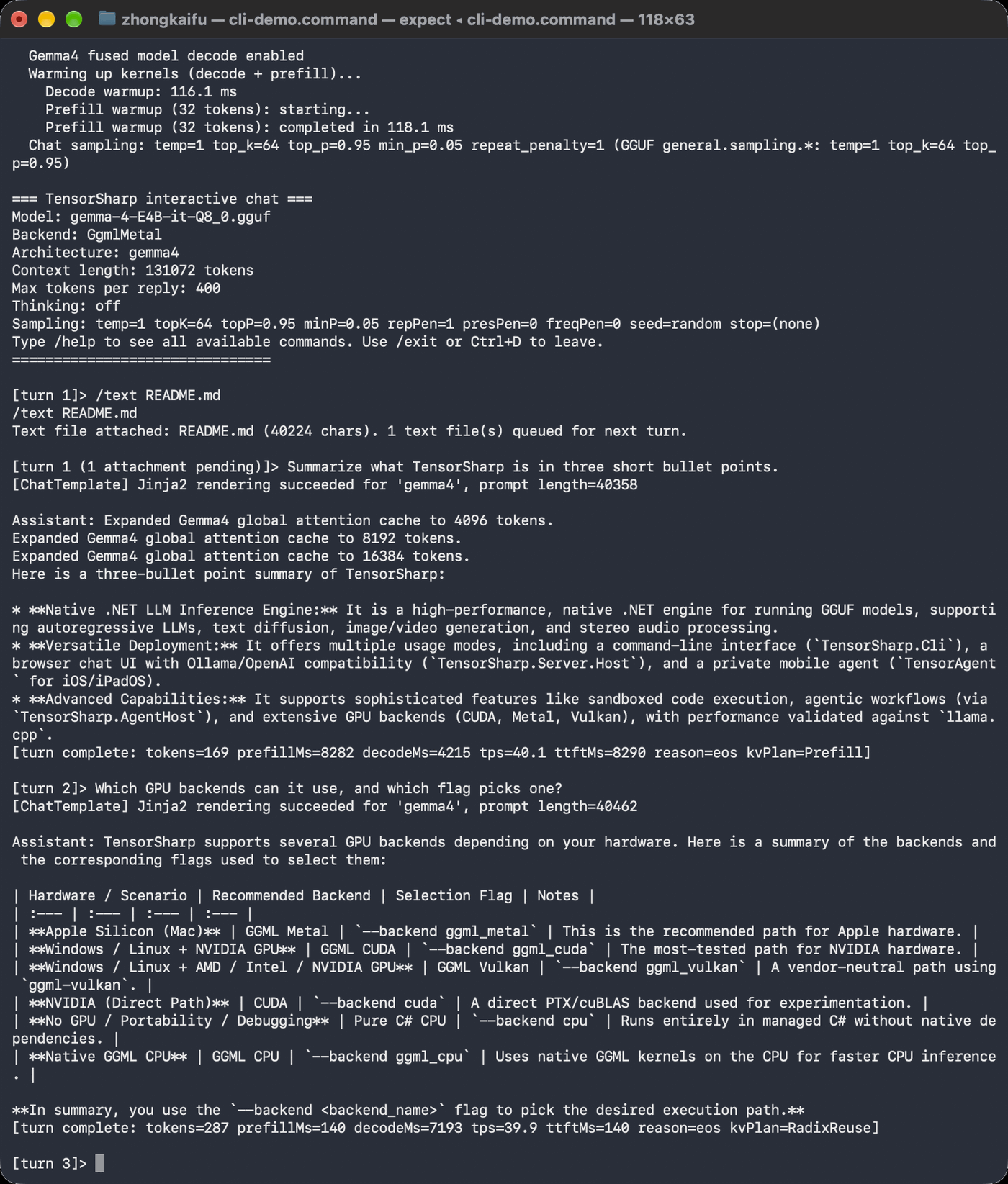
ggml_metal, in the interactive chat (--chat) on an Apple M5 Pro. /text attaches the project README (40,224 characters). Both answers decode at about 40 tokens/s, and the second turn reuses the cached README, so its first token arrives in 140 ms. See Interactive REPL commands.Quick start in ~30 seconds
Start at the TensorSharp repository root after installing the .NET 10 SDK for your platform. The verified quick start builds the native GGML backend and runs the repository's benchmark-verified gemma-4-E4B-it-Q8_0.gguf (7.48 GiB). The commands take about 30 seconds to copy and run; the model download and the first restore/build take longer and depend on your connection and machine. A native source build also needs Git, network access, CMake, and a working C++ toolchain.
Linux + NVIDIA
TENSORSHARP_GGML_NATIVE_ENABLE_CUDA=ON dotnet build TensorSharp.slnx -c Release -p:TensorSharpSkipMlxNative=true
curl --create-dirs --fail -L "https://huggingface.co/ggml-org/gemma-4-E4B-it-GGUF/resolve/main/gemma-4-E4B-it-Q8_0.gguf?download=true" -o models/gemma-4-E4B-it-Q8_0.gguf
echo "Explain local inference in one paragraph." > prompt.txt
dotnet run --project TensorSharp.Cli -c Release --no-build -- --model models/gemma-4-E4B-it-Q8_0.gguf --input prompt.txt --max-tokens 128 --backend ggml_cuda
Windows PowerShell + NVIDIA
$env:TENSORSHARP_GGML_NATIVE_ENABLE_CUDA = 'ON'
dotnet build TensorSharp.slnx -c Release -p:TensorSharpSkipMlxNative=true
curl.exe --create-dirs --fail -L "https://huggingface.co/ggml-org/gemma-4-E4B-it-GGUF/resolve/main/gemma-4-E4B-it-Q8_0.gguf?download=true" -o models\gemma-4-E4B-it-Q8_0.gguf
Set-Content prompt.txt "Explain local inference in one paragraph."
dotnet run --project TensorSharp.Cli -c Release --no-build -- --model models\gemma-4-E4B-it-Q8_0.gguf --input prompt.txt --max-tokens 128 --backend ggml_cuda
Omit --input and the CLI falls back to its built-in What is 1+1? prompt; for your own one-shot text prompt, save the text to a file and pass --input. --prompt is only the prompt for the image- and video-generation models.
Gemma 4 E4B on other native backends
On Apple Silicon, omit the CUDA environment assignment and use ggml_metal; on a supported Windows/Linux Vulkan GPU, request TENSORSHARP_GGML_NATIVE_ENABLE_VULKAN=ON instead and use ggml_vulkan; ggml_cpu runs the native CPU kernels and needs no GPU. The lower-memory gemma-4-E4B-it-Q4_K_M.gguf is in the same repository. Text needs no mmproj. Add the matching mmproj-gemma-4-E4B-it-Q8_0.gguf with --mmproj only for image, video, or audio input. See Getting Started for full platform syntax.
Examples
Run these source commands from the repository root. Replace the sample paths and choose a native backend that your build supports.
# Text inference (macOS)
dotnet run --project TensorSharp.Cli/TensorSharp.Cli.csproj -- \
    --model <model.gguf> --input prompt.txt --output result.txt \
    --max-tokens 200 --backend ggml_metal

# Text inference on Windows/Linux + NVIDIA GPU
dotnet run --project TensorSharp.Cli/TensorSharp.Cli.csproj -- \
    --model <model.gguf> --input prompt.txt --output result.txt \
    --max-tokens 200 --backend ggml_cuda

# Text inference on any Vulkan GPU (AMD / Intel / NVIDIA)
dotnet run --project TensorSharp.Cli/TensorSharp.Cli.csproj -- \
    --model <model.gguf> --input prompt.txt --output result.txt \
    --max-tokens 200 --backend ggml_vulkan

# Multi-GPU host: list the visible Vulkan devices, then pick one by index
dotnet run --project TensorSharp.Cli/TensorSharp.Cli.csproj -- --list-gpus
dotnet run --project TensorSharp.Cli/TensorSharp.Cli.csproj -- \
    --model <model.gguf> --input prompt.txt --max-tokens 200 \
    --backend ggml_vulkan --gpu-device 1

# Interactive turn-by-turn chat (REPL) with KV-cache reuse and slash commands
dotnet run --project TensorSharp.Cli/TensorSharp.Cli.csproj -- \
    --model <model.gguf> --backend ggml_metal --interactive
dotnet run --project TensorSharp.Cli/TensorSharp.Cli.csproj -- \
    --model <model.gguf> --backend ggml_metal -i \
    --system "You are a terse assistant." --temperature 0.7 --top-p 0.9 --think

# DSpark block speculative decoding (DeepSeek V4): --model is the FIRST shard of
# the split GGUF, --draft-model the separate DSpark drafter (cuda / ggml_cuda only).
dotnet run --project TensorSharp.Cli/TensorSharp.Cli.csproj -- \
    --model <DeepSeek-V4-Flash-...-00001-of-00005.gguf> --backend ggml_cuda --layer-split 4 \
    --draft-model <DSpark-drafter.gguf> --input prompt.txt --max-tokens 200 --temperature 0

# GLM 5.x: --model is the FIRST shard; GgufFile finds the rest of the set itself.
# --layer-split 3 places whole layers on 3 local GPUs (e.g. 3x96 GB).
# The advertised 1M context is sized down to the remaining VRAM.
dotnet run --project TensorSharp.Cli/TensorSharp.Cli.csproj -- \
    --model <GLM-5.2-UD-IQ2_XXS-00001-of-00006.gguf> --backend ggml_cuda --layer-split 3 \
    --input prompt.txt --max-tokens 200 --think

# GLM-5.3 (not Flash) is the same 79-block glm-dsa shape as GLM-5.2 (256 routed
# experts at top-8 plus one shared expert, MLA with the lightning indexer), so it
# loads on the GLM-5.2 path with no new code and no new flag; only the file changes.
# unsloth/GLM-5.3-GGUF keeps one subdirectory per quant, each a multi-shard set
# (UD-Q2_K_XL is seven shards, 236.4 GiB), and it is text only: the repo publishes
# no mmproj at any quant, and an --mmproj on glm-dsa is warned about and ignored.
dotnet run --project TensorSharp.Cli/TensorSharp.Cli.csproj -- \
    --model <UD-Q2_K_XL/GLM-5.3-UD-Q2_K_XL-00001-of-00007.gguf> --backend ggml_cuda --layer-split 8 \
    --input prompt.txt --max-tokens 200 --think
Multimodal
# Image inference (Gemma 4, Qwen 3.5-family); --mmproj names the projector (see below)
dotnet run --project TensorSharp.Cli/TensorSharp.Cli.csproj -- \
    --model <model.gguf> --mmproj <mmproj.gguf> --image photo.png \
    --max-tokens 200 --backend ggml_metal

# Video inference (Gemma 4)
dotnet run --project TensorSharp.Cli/TensorSharp.Cli.csproj -- \
    --model <model.gguf> --mmproj <mmproj.gguf> --video clip.mp4 \
    --max-tokens 200 --backend ggml_metal

# Audio inference (Gemma 4)
dotnet run --project TensorSharp.Cli/TensorSharp.Cli.csproj -- \
    --model <model.gguf> --mmproj <mmproj.gguf> --audio speech.wav \
    --max-tokens 200 --backend ggml_metal

# PDF document Q&A (--input holds the question; scanned/image-only PDFs
# need a vision model + --mmproj, born-digital PDFs work with any model)
dotnet run --project TensorSharp.Cli/TensorSharp.Cli.csproj -- \
    --model <model.gguf> --pdf report.pdf --input question.txt \
    --max-tokens 400 --backend ggml_metal
Reasoning, tools & sampling
# Thinking / reasoning mode
dotnet run --project TensorSharp.Cli/TensorSharp.Cli.csproj -- \
    --model <model.gguf> --input prompt.txt --max-tokens 400 --backend ggml_metal --think

# Tool calling
dotnet run --project TensorSharp.Cli/TensorSharp.Cli.csproj -- \
    --model <model.gguf> --input prompt.txt --max-tokens 300 --backend ggml_metal \
    --tools tools.json

# With sampling parameters (one-shot runs default to greedy decoding)
dotnet run --project TensorSharp.Cli/TensorSharp.Cli.csproj -- \
    --model <model.gguf> --input prompt.txt --max-tokens 200 --backend ggml_metal \
    --temperature 0.7 --top-p 0.9 --top-k 40 --repeat-penalty 1.2 --seed 42
Image generation & editing (Qwen-Image-2.1)
# Qwen-Image-2.1: no --image generates an image, --image edits one (repeat it for
# several references). The config downloads the DiT, the dedicated 2.1 VAE and the
# Qwen3-VL-8B text encoder + mmproj. Defaults: 2048x2048, 40 Euler steps, CFG 1.
dotnet run --project TensorSharp.Cli -c Release --no-build -- \
  --config config/qwen-image-2.1.json \
  --prompt 'A small orange cat beside a blue ceramic vase, soft daylight, detailed photograph' \
  --width 2048 --height 2048 --diffusion-steps 40 --cfg 1 \
  --diffusion-seed 42 --output generated.png
dotnet run --project TensorSharp.Cli -c Release --no-build -- \
  --config config/qwen-image-2.1.json \
  --image generated.png \
  --prompt 'Change the blue vase to a red vase. Preserve the cat, lighting and composition.' \
  --width 2048 --height 2048 --diffusion-steps 40 --cfg 1 \
  --diffusion-seed 42 --output edited.png

# A LoRA plug-in: config/lora/ plug-ins download their weights on first use, and a
# step-distilled one brings its sampling recipe (here 6 steps, CFG 1).
dotnet run --project TensorSharp.Cli -c Release --no-build -- \
  --config config/qwen-image-2.1.json \
  --lora config/lora/qwen-image-2.1-viggle-turbo.json \
  --prompt 'A small orange cat beside a blue ceramic vase, soft daylight, detailed photograph' \
  --width 1024 --height 1024 --diffusion-seed 42 --output turbo.png
Local edits: add --mask selection.png to --image photo.png. A matching grayscale mask uses white for edits and black for protected pixels; --mask-mode alpha, --mask-invert, --mask-feather, --mask-crop and --mask-crop-padding control the selection. The result keeps the source dimensions. Full example and mask semantics →
The step-distillation plug-ins in config/lora/ — qwen-image-2.1-viggle-turbo.json, -pruna-8step.json, -pruna-5step.json and -fun-acc-4step.json — replace the 40-step default with their trained 4–8-step recipe, which makes them the main speed lever for image generation. An explicit --diffusion-steps / --cfg still takes precedence, but a step count the recipe has no schedule for is refused. Companions, geometry, the draft settings and the LoRA plug-ins are on Image Generation.
Video generation
MiniMax-H3 denoises the video and a native 32 kHz stereo soundtrack in one packed latent, so the audio comes out of the same forward pass as the picture. It is CFG-distilled, so --cfg 1.0 is required — TensorSharp refuses anything higher — and 4–8 steps is the fast operating point against a 20-step default:
# Text -> H.264 MP4 plus a sidecar WAV. Writes fox.mp4 and fox.wav.
dotnet run --project TensorSharp.Cli/TensorSharp.Cli.csproj -- \
    --model <minimax_h3_fl2va_pruned-Q4_K.gguf> --backend ggml_metal \
    --prompt "a red fox trotting through falling snow, cinematic" \
    --width 640 --height 384 --video-frames 22 --diffusion-steps 8 --cfg 1.0 \
    --output fox.mp4

# Animate a photo: on the FL2VA checkpoint the image IS the first frame.
# Add --end-image to pin the last frame too (--video-mode fl2v).
dotnet run --project TensorSharp.Cli/TensorSharp.Cli.csproj -- \
    --model <minimax_h3_fl2va_pruned-Q4_K.gguf> --backend ggml_metal \
    --image portrait.jpg --video-mode i2v \
    --prompt "the person turns toward the camera and smiles" \
    --width 640 --height 384 --video-frames 22 --diffusion-steps 8 --cfg 1.0 \
    --output animated.mp4

# References: keep the subject, build a new scene around it. Ref2VA checkpoint,
# up to nine --ref-image; --ref-video / --ref-audio take clips and soundtracks.
dotnet run --project TensorSharp.Cli/TensorSharp.Cli.csproj -- \
    --model <minimax_h3_ref2va_pruned-Q4_K.gguf> --backend ggml_metal \
    --ref-image person.jpg --ref-image bottle.png --video-mode ref \
    --prompt "she holds the bottle up to the light on a rooftop at golden hour" \
    --width 640 --height 384 --video-frames 22 --diffusion-steps 20 --cfg 1.0 \
--output rooftop.mp4i2v / fl2v need the fl2va checkpoint and ref needs ref2va — they are separate files, not settings, and asking the wrong one for a mode names the other file in the error. Width and height round up to a multiple of 32, the frame count rounds up onto the 17k+5 grid (5, 22, 39, 56, 73, 90 …) and fps is pinned to 24. The soundtrack is written as a sidecar .wav beside the MP4 rather than muxed in, because muxing needs an encoder that may not be installed: ffmpeg -i fox.mp4 -i fox.wav -c:v copy -c:a aac fox_with_audio.mp4 combines them. --no-audio skips the audio VAE entirely. → the four files H3 needs
Wan 2.1 / 2.2 generate video alone, and there the checkpoint --model points at decides the wall clock:
# Prompt -> H.264 MP4. The UMT5-XXL text encoder and the video VAE are resolved
# next to the DiT GGUF (or pass --video-text-encoder / --video-vae).
dotnet run --project TensorSharp.Cli/TensorSharp.Cli.csproj -- \
    --model <Wan2.2-TI2V-5B-Q8_0.gguf> \
    --prompt "A red fox trotting through falling snow, cinematic" \
    --video-frames 81 --fps 24 --output out.mp4 --backend ggml_cuda

# Image -> video: the image becomes the FIRST FRAME and the prompt drives motion
# (Wan 2.2 TI2V-5B and A14B I2V only).
dotnet run --project TensorSharp.Cli/TensorSharp.Cli.csproj -- \
    --model <Wan2.2-TI2V-5B-Q8_0.gguf> --image first_frame.png \
    --prompt "the camera pushes in as the waves rise" \
    --video-frames 81 --fps 24 --flow-shift 5.0 --output out.mp4 --backend ggml_cuda

# THE FAST LANE: point --model at a step-distilled checkpoint. Nothing else in the
# command changes; the file name alone switches the run to 4 guidance-free passes.
dotnet run --project TensorSharp.Cli/TensorSharp.Cli.csproj -- \
    --model <Wan2_2-TI2V-5B-Turbo-Q8_0.gguf> --image first_frame.png \
    --prompt "the camera pushes in as the waves rise" \
--video-frames 121 --fps 24 --output out.mp4 --backend ggml_metalStep distillation is the single biggest lever, and it is not a flag. A base Wan2.2-TI2V-5B follows the official 50-step × 2-CFG recipe = 100 DiT passes; a distilled Turbo / Lightning / FastWan checkpoint is trained guidance-free and costs 4. TensorSharp detects it from the DiT file name (turbo, distill, lightning, lightx2v, fastwan, -dmd, or an explicit …-4steps-… / …8step… for 1–16) and prints step-distilled checkpoint detected -> 4 steps, guidance off on load. On an M5 Pro at 1088×832 × 121 frames the identical request takes ≈3 h 30 m on the base checkpoint and 17 m 30 s on Turbo. --diffusion-steps / --cfg override the detected values. → Where to download one · the measurements
DiffusionGemma & inspection
# DiffusionGemma text-diffusion generation
dotnet run --project TensorSharp.Cli/TensorSharp.Cli.csproj -- \
    --model <diffusion-gemma.gguf> --input prompt.txt --backend ggml_metal \
    --max-tokens 256 --diffusion-steps 48 --diffusion-seed 0

# DiffusionGemma with an image (image input only; no audio or video). The Gemma 4
# vision tower comes from an mmproj GGUF or, for diffusiongemma-26B-A4B-it, which
# ships no mmproj, straight from its HuggingFace shard model-00011-of-00011.safetensors.
dotnet run --project TensorSharp.Cli/TensorSharp.Cli.csproj -- \
    --model <diffusion-gemma.gguf> --mmproj <model-00011-of-00011.safetensors> \
    --image photo.png --input prompt.txt --backend ggml_metal --max-tokens 256

# Inspect the rendered prompt and tokenization without running inference
dotnet run --project TensorSharp.Cli/TensorSharp.Cli.csproj -- \
    --model <model.gguf> --input prompt.txt --dump-prompt
Batch & benchmarks
# Batch processing (JSONL)
dotnet run --project TensorSharp.Cli/TensorSharp.Cli.csproj -- \
    --model <model.gguf> --input-jsonl requests.jsonl \
    --output results.txt --backend ggml_metal

# Multi-turn chat simulation with KV-cache reuse (mirrors the web UI behavior)
dotnet run --project TensorSharp.Cli/TensorSharp.Cli.csproj -- \
    --model <model.gguf> --multi-turn-jsonl chat.jsonl \
    --backend ggml_metal --max-tokens 200

# Throughput benchmark: best-of-N prefill and decode timing
dotnet run --project TensorSharp.Cli/TensorSharp.Cli.csproj -- \
    --model <model.gguf> --backend ggml_metal \
    --benchmark --bench-prefill 256 --bench-decode 128 --bench-runs 3
The JSONL format is one JSON object per line, with optional sampling fields (temperature, top_k, top_p, min_p, repetition_penalty, repeat_last_n, presence_penalty, frequency_penalty, seed, stop); a field a line leaves out keeps the command-line value, the --repeat-last-n window included:
{"id": "q1", "messages": [{"role": "user", "content": "What is 2+3?"}], "max_tokens": 50}
{"id": "q2", "messages": [{"role": "user", "content": "Write a haiku."}], "max_tokens": 100, "temperature": 0.8}
Configuration file (--config)
Instead of a long command line, pass a JSON file with --config. The server reads the same format. Command-line options always win—when the command line sets a single-valued option itself, that option's entry in the file is dropped before it is resolved (not emitted, its variables not substituted, its download never attempted), so one file can be reused across machines while you override just what differs. Each override prints one [config] --X is set on the command line, so the value from '<file>' is ignored … line to stderr. Repeat --config to layer files (a later file's entry replaces an earlier one's the same way). The repeatable options — --stop, --skills-dir, --skill, --lora, --lora-scale, --lora-config, --image and the --ref-* inputs — keep the file's values and add the command line's after them. Comments and trailing commas are allowed.
# Use the file, but override the backend for this run
dotnet run --project TensorSharp.Cli/TensorSharp.Cli.csproj -- \
    --config config/cli-basic.json --backend ggml_cpu
Keys are the same long option names below (with or without the leading --). A string/number becomes --key value, true becomes the bare switch --key, and an array becomes a repeated flag. false and null emit nothing, so to turn a default-on option off name its negation ("no-continuous-batching": true). lora-scale and lora-config cannot be arrays, and a removed option (such as offload-cpu) is refused as a key. The CLI ignores keys it does not know, so a server-only key such as port has no effect here; repeat-last-n is spelled the same on both hosts and applies to either.
Variables. Define shared values once under "variables" (alias "vars") and reference them with ${name}, or ${name:-fallback} for a default, in any string value (an undefined name falls back to an environment variable of the same name). Declare as many roots as you need.
Auto-download. Any file option can be an object with a local path and one or more urls (or a single url). A relative path resolves against the config file's folder. If path is missing it downloads from the first working URL (mirrors tried in order), saves it there, and reuses it next time; progress prints to stderr, and an optional sha256 verifies a fresh download (an existing file is used as-is). A download entry whose option the command line (or a later file) also sets is dropped before it is resolved, so nothing is fetched for it — --mmproj none skips a configured projector's download.
{
  "variables": { "modelRoot": "C:/models", "hf": "https://huggingface.co" },
  "backend": "ggml_cuda",
  "max-tokens": 256,
  "temperature": 0.7,
  "model": {
    "path": "${modelRoot}/Qwen3.5-9B-Q8_0.gguf",
    "urls": [ "${hf}/unsloth/Qwen3.5-9B-GGUF/resolve/3885219b6810b007914f3a7950a8d1b469d598a5/Qwen3.5-9B-Q8_0.gguf" ],
    "sha256": "809626574d0cb43d4becfa56169980da2bb448f2299270f7be443cb89d0a6ae4"
  }
}
Ready-to-use examples live in the repository's config/ folder (cli-basic.json, server-basic.json, variables.json, auto-download.json, qwen-image-2.1.json) — each uses real, public, ungated URLs, so it works on a fresh machine. See config/README.md for the full reference.
Command-line options
Running the CLI with no arguments — or with --help (also -h, -?, /?) — prints the full parameter reference: every option with its description, default, range, and an example. It exits before any logging or model machinery starts. Documented options are case-insensitive and also accept the --option=value form, as on the server; a switch given a value (--think=on) or a value option with nothing after it is a configuration error (exit code 1). Unknown arguments are ignored, so copy option names carefully—a misspelling may otherwise appear to succeed. (The server is stricter: it refuses to start on an unknown option, and suggests the closest known one when it is within two edits.)
Input / output
| Option | Description |
|---|---|
--model <path> | Path to a GGUF model file (required). |
--input <path> | Text file containing the user prompt. One-shot text prompts always come from a file — --prompt is reserved for the image- and video-generation prompt. |
--pdf <path> | PDF document input (one-shot mode). Born-digital PDFs are inlined with their complete extracted text; scanned/image-only PDFs are rasterized to page images and require a vision model + --mmproj. --input becomes the question about the document; TS_PDF_MAX_PAGES caps the pages read (default: all). |
--input-jsonl <path> | JSONL file with batch requests (one JSON per line). |
--multi-turn-jsonl <path> | JSONL file for multi-turn chat simulation with KV-cache reuse. |
--output <path> | Write generated text to this file. |
--image / --video / --audio <path> | Media file for vision / video / audio inference (audio needs an audio-capable model such as Gemma 4). --image is repeatable. |
--mmproj <path|none> | Multimodal projector: an mmproj GGUF, or — for the Gemma 4 family, DiffusionGemma included — a HuggingFace .safetensors shard holding the vision tower, for checkpoints published without an mmproj (diffusiongemma-26B-A4B-it). none (any case) loads no projector and skips the lookup, as on the server. When --image, --audio or --video is given without it, the CLI looks beside the model for the architecture's own companion file names — Gemma 4 gemma-4-mmproj-F16.gguf; Qwen 3.5 family Qwen3.5-mmproj-F16.gguf (Bonsai2: Ternary-Bonsai-2-27B-mmproj-BF16.gguf / -Q8_0.gguf); Muse-Glimmer *mmproj*Muse*Glimmer*.gguf; GLM-5.x and Qwen 3.8 Flash Next *mmproj*.gguf; Mistral 3 mistral3-mmproj.gguf / *mmproj*istral*.gguf; Nemotron-H *Nemotron*mmproj*.gguf / *mmproj*Nemotron*.gguf; DeepSeek V4.1 deepseek41.vision.gguf — and a .safetensors vision shard is never auto-detected, so pass anything else explicitly. |
Runtime
| Option | Description |
|---|---|
--max-tokens <N> | Maximum tokens to generate (default: 100). |
--backend <type> | Compute backend: cpu, cuda, mlx, ggml_cpu, ggml_metal, ggml_cuda, ggml_vulkan (default: ggml_cpu). |
--gpu-device <N> | Vulkan device index for the ggml_vulkan backend on multi-GPU hosts (default: 0; env TS_GGML_VULKAN_DEVICE). |
--list-gpus | List the Vulkan devices ggml-vulkan can see (index + adapter name) and exit. |
--help | Print the full parameter reference (description, default, range, and an example per option) and exit; also shown when the CLI is started with no arguments. |
--kv-cache-dtype <type> | KV cache precision: f32, f16, q8_0, or q4_0 (default: auto — the backend/model pick; overrides the KV_CACHE_DTYPE env var). The block-quantized tiers require the native GGML flash-attention path; q4_0 (~1/7 the f32 footprint) targets very long 128K–256K contexts. |
--n-cpu-moe <N> / -ncmoe <N> | Keep the routed MoE expert weights of the first N layers in system RAM and multiply them on the CPU; attention, norms, the router and the shared expert stay on the accelerator. Pass all for every layer. Default: 0 on every architecture. DeepSeek V4 no longer offloads on its own: a checkpoint that does not fit is refused at load with the fewest layers that would. On GLM 5.x the host-resident experts are served straight from the GGUF mapping with no private copy (TS_GLM_MOE_MMAP=0 copies instead), and the flag composes with --tp — host-resident layers keep their experts whole and rank 0 evaluates them. It is a way to fit a checkpoint that would not otherwise load, not a speed knob: on GLM-5.2 --n-cpu-moe 30 takes pp2048 from 915.9 to 94.7 t/s, but raises the context the loader can size from 342,272 to 646,400 tokens. Env: TS_N_CPU_MOE. |
--cpu-moe / -cmoe | Shorthand for --n-cpu-moe all (env TS_CPU_MOE). |
--cpu-moe-threads <N> | Worker threads for the host-side expert matmul. The default follows the CPU parallelism this process can actually use (after the affinity mask and the cgroup quota): 1 with 2 or fewer CPUs, all but one with up to 8, and half above that, capped at 64; DeepSeek V4 / V4.1 and GLM-5.x on their native executors use every usable CPU once experts are offloaded (GLM-5.x also on a GPU-less run). Do not exceed the cgroup CPU quota — ggml's pool spins at its barriers, so oversubscription collapses throughput. Env: TS_CPU_MOE_THREADS. |
--interactive / -i / --chat | Start the interactive REPL (see below). It samples by default instead of decoding greedily — see Sampling. |
--system <text> / --system-file <path> | System prompt from text or a file. One-shot runs (with or without skills), the interactive REPL and DiffusionGemma all use it; the JSONL batch modes do not. |
--think | Enable thinking / reasoning mode (chain-of-thought). |
--tools <path> | JSON file with tool / function definitions. |
--skills-dir <path> · --skill <name> | Agent Skills: a directory of model-facing instruction folders, and which of them to select for this run. The model pulls what it needs through built-in tools the CLI answers itself — see Agent Skills below for the full set of flags. |
--code-exec | Enable TensorSharp's built-in agentic code tools. Off by default; see Agentic work and code execution. |
--spec · --spec-type <name> · --draft-model <path> | Speculative decoding: a drafter proposes the next few tokens and the trunk verifies them in one batched forward. Off by default, and it has to be on the command line before the model loads — see Speculative decoding below for the full set. |
--dump-prompt | Render the prompt + tokenization and exit (no generation). |
--tp <N> | Tensor-parallel degree, for sharding weights within layers only (default 1; env TENSORSHARP_TP_DEGREE). Requires a supported model and GPU backend. Mutually exclusive with --layer-split; unsupported requests fail at startup. |
--layer-split <N> | Local GPU count for whole-layer placement on supported architectures; env TENSORSHARP_LAYER_SPLIT_DEGREE. Single-node only; cannot be combined with TP or distributed TP settings. |
--tp-node-id <N> | This node's 0-based ID for multi-node distributed tensor parallelism. Use together with --tp-peers. |
--tp-peers <list> | Comma-separated host:port list of every node in the cluster (e.g. 192.168.1.10:9500,192.168.1.11:9500). Identical on all nodes; the port is not a default and must be reachable between them. |
--no-prefix-cache | Turn off the Radix prefix cache, which is on by default for one-shot, interactive, JSONL and skill/tool runs, together with the interactive system/tool prompt warm-up; it also sets TS_SCHED_PREFIX_CACHE=0. The CLI keeps the cache in memory only, so a restart starts cold. |
--continuous-batching / --no-continuous-batching | Enable (default) or disable paged-attention continuous batching in the shared inference engine. |
--config <path> | Read options from a JSON config file (command-line options override it). Supports ${variables} and auto-downloading models. Repeatable. |
Sampling
One-shot and batch runs default to greedy decoding: temperature 0, top-k 0, top-p 1.0, min-p 0, penalties off, seed -1 (unlike the server, whose defaults match Ollama) — the defaults listed below. The interactive REPL (-i / --interactive / --chat) samples instead, because greedy chat degenerates into repetition on long answers: temperature 0.8, top-k 40, top-p 0.95, min-p 0.05 and a 64-token penalty window with the repeat penalty left at 1.0, overridden by the GGUF's own general.sampling.* values when it ships them. A flag you pass always wins, in either mode.
| Option | Description |
|---|---|
--temperature <f> | Sampling temperature (default 0 = greedy). |
--top-k <N> | Top-K filtering (default 0 = disabled). |
--top-p <f> | Nucleus sampling threshold (default 1.0 = disabled). |
--min-p <f> | Minimum probability filtering (default 0 = disabled). |
--repeat-penalty <f> | Repetition penalty (default 1.0 = none). |
--repeat-last-n <N> | How many of the most recent tokens the repeat / presence / frequency penalties consider (default 64; 0 disables history penalties, -1 uses the whole history). The same spelling as the server and the repeat_last_n request field, so one config key drives both hosts; the former CLI-only --penalty-last-n is removed. |
--presence-penalty <f> / --frequency-penalty <f> | Presence / frequency penalties (default 0 = disabled). |
--seed <N> | Random seed (default -1 = non-deterministic). |
--stop <string> | Stop sequence (can be repeated). |
Speculative decoding
Off by default. A drafter proposes the next few tokens and the trunk verifies them in one batched forward; every emitted token is still drawn from a trunk row with the run's own sampler, so this is a speed path only — the stream is the one plain decoding would have produced. It engages on --input, --input-jsonl, --multi-turn-jsonl and --interactive, and the flags have to be on the command line before the model loads: --spec is what tells glm-dsa to page its ~3 GiB NextN layer into VRAM (which also leaves less room for the context), and --spec-draft sizes the native graph cache at load. → MTP / NextN · DSpark · docs/speculative_decoding.md
| Option | Description |
|---|---|
--spec / --no-spec | Enable / disable speculative decoding — the explicit opt-in for drafters embedded in the trunk checkpoint (GLM-5.2, GLM-5.3, Qwen 3.6 NextN), since loading them pages extra weights into VRAM; a drafter named with --draft-model engages without it, and --no-spec vetoes that too. Not available under --tp N>1 on a checkpoint whose draft block borrows the trunk's LM head — which includes GLM-5.2 and GLM-5.3, whose complete NextN block at blk.78 ships no nextn.shared_head_head.weight of its own, so speculation engages on single-device or explicit --layer-split N placement (no active tensor parallelism). Default: off; env TS_SPEC. |
--spec-type <name> | Which speculation algorithm drafts. auto (default) uses whatever drafter the checkpoint carries — a per-token NextN/MTP head (embedded in Qwen 3.6, Qwen 3.8 27B, GLM-5.2 and GLM-5.3; Gemma 4's separate assistant GGUF; Qwen 3.8 Flash Next's shared MTP GGUF) or a block drafter (DeepSeek V4 DSpark, DFlash / DFlash2 on Muse-Glimmer and Qwen 3.8). draft-head and block pin one of those explicitly. ngram needs no trained weights at all: it drafts by finding where the last few tokens occurred earlier in the context and proposing what followed. It still needs a trunk that can verify speculatively, so it does not run on GPT-OSS, Mistral 3 or Hunyuan Dense; DeepSeek V4 / V4.1 and Muse-Glimmer verify only through their own block drafter, so there it runs only while that drafter is loaded with --draft-model; and Nemotron-H refuses every speculator. --spec-type only chooses the algorithm — turn n-gram on with --spec --spec-type ngram; given without --spec or --draft-model (and with TS_SPEC unset), it, --spec-draft and --spec-pmin leave speculation off, and startup warns that it stays off. Env: TS_SPEC_TYPE. |
--spec-draft <N> | Maximum tokens drafted per speculative step. It also sizes the native graph cache at load, so it belongs on the same command line as --spec. Range 1–64, default 8 — a block drafter defaults to its trained block size instead and additionally clamps the value to it (5 for DSpark); env TS_SPEC_DRAFT. |
--spec-pmin <f> | Confidence gate below which drafting stops. What the number means is the algorithm's business, so each picks its own default instead of sharing one: 0.15 for a per-token head (top-1 probability over its top-10 logits), 0.35 for a block drafter (the cumulative prefix probability, so the same number is far stricter), 0 for n-gram (where it scales the required match length instead). Lower drafts further and rolls back more; higher falls back to plain decode sooner. Range 0.0–1.0; 0 is accepted and means never gate. Env TS_SPEC_PMIN. |
--draft-model <path> | Drafter GGUF for every speculator that ships as its own file — DeepSeek V4's DSpark support module, the DFlash / DFlash2 drafters for Muse-Glimmer and Qwen 3.8, Gemma 4's gemma4-assistant draft head, and Qwen 3.8 Flash Next's shared MTP head (GGML backends). The file's own general.architecture decides how it loads (the operator never chooses a mechanism), and naming the file is the request: it enables speculation by itself, no --spec needed (an explicit --no-spec vetoes it). A block drafter has to be resident before the model's layer split runs, and DeepSeek V4's DSpark exists only on --backend cuda and ggml_cuda. DeepSeek V4.1 accepts a deepseek41-dspark drafter on ggml_cuda / ggml_cpu only; that path is experimental; initial text/image HTTP probes with trained weights passed using two-GPU layer split on ggml_cuda; broad quality and throughput remain unqualified. A DFlash / DFlash2 drafter runs on one GPU: under --tp N > 1 the CLI declines it with a warning and serves standard decoding. Qwen 3.6, Qwen 3.8 27B, GLM-5.2 and GLM-5.3 embed their NextN block in the trunk GGUF and need no file — GLM-5.3 carries a complete one at blk.78, so there is nothing extra to download — but on Qwen 3.6 only a GGUF that kept it does, so use an MTP-retaining export such as unsloth/Qwen3.6-35B-A3B-MTP-GGUF; the base repo ships the same file names with the block stripped. Env: TS_SPEC_DRAFT_MODEL. → DSpark |
--spec --spec-type ngram runs on a checkpoint that ships no drafter at all — on families whose trunk can verify without a drafter (see --spec-type above). It drafts by quoting the context back, so it is strong exactly where the answer already exists in the prompt: summarizing, editing, translating, repetitive structured output and agentic loops. Measured 45.2 tok/s against 31.4 plain (1.44×) on Qwen3.5-9B (Q8_0, ggml_metal, M5 Pro), with byte-identical output.
DiffusionGemma, benchmarks & logging
| Option | Description |
|---|---|
--diffusion-steps <N> | DiffusionGemma denoising steps per block (default: 48). |
--diffusion-seed <N> | DiffusionGemma deterministic sampler seed (default: 0). |
--diffusion-blocks <N> | Block-autoregressive canvas count (0 derives it from --max-tokens). |
--image <path> / --prompt <text> / --output <path> | Qwen-Image-2.1: reference image for editing (repeatable, each tagged <image1>, <image2>, … in command-line order ahead of the prompt, so the prompt can name it; omit --image to generate), the prompt, and the output PNG (default generated.png, or edited.png when editing). Reuses --diffusion-steps (default 40, or a step-distillation plug-in's 4–8) / --diffusion-seed. |
--mask <path> · --mask-mode grayscale|alpha · --mask-invert · --mask-feather <px> · --mask-crop · --mask-crop-padding <px> | Qwen-Image-2.1 local editing: a mask matching the first reference selects editable pixels, with inversion, inward feathering and optional region cropping. Output retains the source dimensions and protected pixels. These are CLI flags; the server takes matching per-request fields. Semantics and ranges → |
--cfg <F> | Qwen-Image-2.1 true-CFG guidance scale (omit for auto: 1.0, one transformer prediction per step, or a --lora plug-in's recipe; <= 1 disables the negative pass). |
--negative-prompt <text> | Qwen-Image-2.1 negative prompt (default: empty, an unconditional pass). Used only when --cfg is above 1, since no negative pass runs otherwise. |
--qwen-image-vae / --qwen-image-vl / --qwen-image-mmproj <path> | Override the resolved Qwen-Image-2.1 companions (dedicated 2.1 VAE / Qwen3-VL-8B text encoder / Qwen3-VL-8B mmproj). |
--lora <path> | Qwen-Image-2.1 LoRA plug-in: a LoRA .safetensors or a TensorSharp plug-in config .json (see config/lora/). Repeat to stack. Applied unmerged on top of the quantized transformer; refused with any other model. → LoRA plug-ins |
--lora-scale <f> | Strength of the preceding --lora (multiplies alpha / rank). Default: the plug-in config's "scale", else 1.0. |
--lora-config <path> | Companion config of the preceding --lora: a TensorSharp LoRA config, a PEFT adapter_config.json or a VideoX-Fun pdd_config.json. A plug-in's recipe supplies steps, sigmas and CFG unless --diffusion-steps / --cfg are given. |
--qwen-image-lora · --offload-cpu | Removed and rejected at startup, including as --config keys. Both served only the earlier Qwen-Image-Edit pipeline. --qwen-image-lora is replaced by --lora; --offload-cpu has no replacement, because Qwen-Image-2.1 keeps its DiT weights resident. |
--penalty-last-n | Removed and rejected at startup, including as a --config key (exit code 1). It was the CLI-only name of the repeat-penalty window: use --repeat-last-n <N>, the spelling both hosts and the repeat_last_n request field use. |
--paged-kv* · --paged-bench* · --paged-batching | Removed and rejected at startup, including as --config keys (exit code 1). The standalone paged KV store they configured and benchmarked is gone: prompt reuse across requests is the engine's radix prefix cache (--no-prefix-cache), and its TS_KV_* variables are refused too. --paged-batching / --no-paged-batching were second spellings of --continuous-batching / --no-continuous-batching. |
--width <px> / --height <px> | Fixed Qwen-Image-2.1 output size, in multiples of 32 (default 0 = auto: 2048×2048 for generation, or about that area at the first reference's aspect ratio for editing). |
--benchmark | Run a synthetic prefill/decode throughput benchmark. |
--bench-prefill / --bench-decode / --bench-runs <N> | Synthetic prefill length, decode length, and run count. |
--bench-chunked · --bench-fixed-tokens | Benchmark prefill through the server-style chunked path; time decode over a predetermined token stream without host greedy sampling (for llama-bench-style comparison). |
--bench-random-tokens | Like --bench-fixed-tokens, with prompt and decode ids drawn uniformly from the whole vocabulary, new ones every run (seeded), as llama-bench draws them. Use it for models that read per-token tables or experts from disk. |
--bench-kvcache / --bench-kv-turns <N> | Multi-turn KV-cache reuse benchmark (with-cache vs forced-reset). |
--warmup-runs <N> | Throw-away forward passes before timing (default: 0). |
--log-level <lvl> | trace, debug, info, warning, error, critical, off. CLI only: the server has no --log-* flags and reads TENSORSHARP_LOG_LEVEL / …_LOG_DIR / …_LOG_FILE instead, which the CLI also honours as defaults. |
--log-dir <path> / --log-file <0|1> / --log-console <0|1> | JSON-line file logger directory and toggles. |
Video generation (MiniMax-H3 · Wan 2.1 / 2.2)
These apply when --model is a video-generation DiT — MiniMax-H3 or Wan. --prompt carries the text, --image supplies the conditioning frame, and --output names the MP4 (default video.mp4; a .png extension writes the frames as PNGs instead). The denoise step count and guidance come from the model's own recipe unless you override them with --diffusion-steps / --cfg.
| Option | Description |
|---|---|
--video-mode <mode> | How supplied images are interpreted, on models with more than one conditioning mode. Default: inferred from what you pass. MiniMax-H3 accepts t2v (text only), i2v (the image is the first frame and gets animated), fl2v (first and last frame) and ref (the images are identity/appearance references for a new scene). i2v/fl2v need the fl2va checkpoint and ref needs ref2va — separate files, not settings. On ref2va a plain --image is taken as a reference, so clients that only attach one image work unchanged. |
--width <px> / --height <px> | Output canvas. MiniMax-H3 rounds each dimension up to a multiple of 32 (the VAE's 16× spatial ratio times the 2×2 patch) and defaults to 640×384 — the model card's own working point and the smallest size at which faces stay coherent; pass only one of the two and the other follows the conditioning image's aspect ratio. Wan snaps to its own VAE grid instead, and defaults to its recipe's area: 1280×704 for TI2V-5B, 832×480 elsewhere. Reference images never set the canvas. |
--video-frames <N> | Output frame count, snapped to the model's temporal grid — 4k+1 for Wan, 17k+5 for MiniMax-H3; 1 renders a single still where the model allows it. Default: the model's own (33, or 49 for Wan2.2-TI2V; 22 for MiniMax-H3). Frame count drives both the attention cost and the VAE decode, so it is the second-biggest lever after the checkpoint. |
--fps <N> | Playback rate of the saved MP4 (default 16, or 24 for Wan2.2-TI2V — the models' training rates). This changes playback, not the amount of work. Models trained at a fixed rate — MiniMax-H3 at 24 fps — override any other value. |
--end-image <file> | Last-frame conditioning image, on models that accept one (MiniMax-H3 first/last-frame mode). Combined with --image the clip is steered to start and end on the two frames. |
--ref-image <file> | Reference image for reference-conditioned models (MiniMax-H3 Ref2VA): the subject carries over while camera, background and composition come from the prompt. Repeatable up to 9; the prompt refers to them positionally as <Picture 1>, <Picture 2>, … References are only ever scaled down and keep their own aspect ratio, so the output size still comes from --width/--height. Denoise cost is linear and flat — ~626 ms per reference per step on an RTX 3080 Laptop (640×384, 22 frames, anywhere from one to eight). Past about four it is the text pass that dominates, not the denoiser: each reference adds ~250 vision placeholder tokens prefilled through all 50 Qwen3-VL layers, so reach for fewer, better references before reaching for fewer steps. |
--ref-video <path> | Reference video clip, repeatable; referred to in the prompt as <Video 1>, <Video 2>, … Accepts a video file or a directory of frames; either way it is resampled onto the model's own 24 fps and its own canvas. A reference clip is the most expensive input H3 takes: a 22-frame 448×320 one adds 980 conditioning tokens on top of the 1680 the output itself needs, and the VAE has to encode all 22 frames before the first denoise step. Pair a soundtrack with --ref-video-audio. |
--ref-video-audio <file> | Soundtrack for the reference video at the same position — the first pairs with the first --ref-video, and so on. Separate from --ref-video because a container's audio track is not readable through the frame decoder. Omit it for a silent reference clip. WAV, MP3 or Ogg. |
--ref-audio <file> | Standalone reference soundtrack, repeatable; referred to in the prompt as <Audio 1>, <Audio 2>, … Resampled to the audio VAE's 32 kHz stereo and truncated to the generated clip's duration. |
--no-audio | Skip audio decoding on models that generate an audio track jointly with the video (MiniMax-H3), saving the audio VAE's time and memory when only the picture is wanted. Ignored by video-only models. |
--flow-shift <F> | FlowMatch timestep shift (default 0 = the model's official recipe: 5.0 for Wan 2.2, 12.0 for A14B T2V; Wan 2.1 uses 8.0 for the 1.3B model's video runs, else 3.0 at ≤ 480p and 5.0 above; 12.0 for MiniMax-H3). On a model with a joint audio stream this shifts the video stream only. |
--sampler <name> | unipc (the official Wan sampler; multistep predictor-corrector, better quality at the same step count) or euler. Default: the model's own — unipc for Wan. It is a Wan-family knob: MiniMax-H3 runs its own flow-match schedule and ignores it. |
--negative-prompt <text> | Negative prompt for classifier-free guidance (default: the model's official negative prompt). Unused at --cfg 1.0, where no negative pass runs — so it does nothing on a step-distilled Wan checkpoint, nor on CFG-distilled MiniMax-H3. |
--cfg-cache-stride <N> | Guidance cache: run the unconditional CFG pass on one step in N and reuse the cached guidance direction in between (the first three steps and the last always recompute it). At 50 steps, 2 runs 77 of the 100 passes (1.30× faster) and 3 runs 70 (1.43×). Default 0 = off. It is an approximation — leave it off when matching a reference sample matters, and note it has no effect at --cfg 1.0, where there is no unconditional pass to cache. |
--diffusion-steps <N> / --cfg <F> | Override the recipe or the auto-detected distilled values. On base Wan checkpoints 30 steps instead of 50 is visibly close and 1.7× cheaper. MiniMax-H3 is CFG-distilled: it defaults to 20 steps, refuses any --cfg above 1.0, and 4–8 steps is its fast operating point. |
--video-vae <path> | Video VAE — wan_2.1_vae.safetensors, Wan2.2_VAE.safetensors for TI2V-5B, or minimax_h3_video_vae_fp16.safetensors for MiniMax-H3. Default: same-directory scan next to the DiT, VAE/ subfolders included. Env: TS_VIDEO_VAE. Which VAE is required is decided by the DiT itself, not by you. |
--video-text-encoder <path> | Text-encoder GGUF — UMT5-XXL for Wan, Qwen3-VL-32B for MiniMax-H3. Default: same-directory scan; env TS_VIDEO_TEXT_ENCODER. The H3 encoder ships no tokenizer — put vocab.json and merges.txt beside it, or point TS_VIDEO_TOKENIZER at the folder holding them. |
--video-dit2 <path> | Second diffusion expert on dual-expert models (Wan 2.2 A14B's high/low-noise pair). Default: auto-resolved by filename next to the first expert. Env: TS_VIDEO_DIT2. |
--audio-vae <path> | Audio VAE for models that generate an audio track jointly with the video (minimax_h3_audio_vae_fp32.safetensors). Without it such a model still runs and produces video, just no audio. Env: TS_VIDEO_AUDIO_VAE. |
Of the video families, Wan runs on ggml_cuda, ggml_vulkan, ggml_metal, ggml_cpu, cuda and cpu — it is the one family that rejects --backend mlx outright. Neither Wan nor MiniMax-H3 has a multi-GPU path: unsupported --tp N / --layer-split N requests and distributed groups are refused at load. → MiniMax-H3 measurements · Wan backend timings and cost model
See the full reference, including --test, --test-templates, and chunked-prefill correctness checks, on the API Reference page.
Agent Skills
A skill is a folder holding a SKILL.md plus its scripts, references and assets. The CLI advertises names and descriptions; for a tool-capable model even an explicitly selected skill starts as metadata only, and the model reads its instructions through skills_read when it decides to use it. Families that cannot complete a tool round trip receive selected bodies inline instead. → What the feature does · Over HTTP · From C# · Agentic architecture
| Option | Description |
|---|---|
--skills-dir <path> | Directory to scan for Agent Skills (a folder holding SKILL.md files, or a single skill directory). Repeatable; scanned in the order given, up to three levels deep. Without it, the defaults are every existing .agents/skills directory from the working directory up to its Git repository root (nearest first; outside a repository only the working directory is checked), then a skills directory beside the binary, created if missing. Personal skill directories are never loaded implicitly. A path that does not exist is a startup error naming the flag. Env: TS_SKILLS_DIR (a path-separator-separated list); explicit roots from either replace the defaults. |
--skill <name> | Select a skill for this run, by the name in its SKILL.md. Repeatable. Selection advertises its metadata and makes it reachable; a tool-capable model still reads the body on demand. |
--list-skills | Print the skill registry — name, description, origin, bundled files, size, and any load warnings or errors — and exit. |
--no-skills | Turn Agent Skills off entirely: no scanning, no prompt block, no tools. Env: TS_NO_SKILLS (anything but 0 counts as on). |
--skills-no-discovery | Do not advertise unselected skills to the model. Without it, every registered skill's name and description are listed so the model can load one you did not think to name; with it, a run sees exactly the skills --skill selected. |
--skills-allow-exec | Declare skills_run so the model may run a selected skill's bundled script. Off by default; this is arbitrary code execution. Path checks, an interpreter allow-list, a scrubbed environment, closed stdin, a 60 s deadline and 32 KiB stdout/stderr caps always apply; OS confinement follows --skills-sandbox. Env: TS_SKILLS_ALLOW_EXEC. |
--skills-sandbox <off|preferred|required> | Script isolation policy. required is the default and refuses when write, network and home-read confinement are unavailable; preferred may run with reported gaps; off keeps only in-process limits. macOS uses Seatbelt, Linux needs bubblewrap 0.12+, and Windows job objects cannot confine files or network. Env: TS_SKILLS_SANDBOX. |
--skills-allow-network | Let bundled skill scripts use the network; denied by default and independent of code-execution networking. Env: TS_SKILLS_ALLOW_NETWORK. |
--skills-max-rounds <n> | Maximum internal model/tool generations, 1–64. Default 8 for skill disclosure and automatically 24 when --code-exec is offered; an explicitly set value is preserved. Env: TS_SKILLS_MAX_ROUNDS. |
# What is registered, where it came from, and any load warnings
dotnet run --project TensorSharp.Cli/TensorSharp.Cli.csproj -- \
    --skills-dir ~/skills --list-skills

# One-shot with a skill selected
dotnet run --project TensorSharp.Cli/TensorSharp.Cli.csproj -- \
    --model <model.gguf> --backend ggml_metal \
    --skills-dir ~/skills --skill pdf --input prompt.txt --max-tokens 600

# Two skills, no discovery: the model sees exactly these and nothing else
dotnet run --project TensorSharp.Cli/TensorSharp.Cli.csproj -- \
    --model <model.gguf> --backend ggml_cuda --skills-dir ~/skills \
    --skill pdf --skill xlsx --skills-no-discovery --input prompt.txt

# Interactive, with script execution enabled (your own machine, your own skills)
dotnet run --project TensorSharp.Cli/TensorSharp.Cli.csproj -- \
    --model <model.gguf> --backend ggml_metal --skills-dir ~/skills \
    --skills-allow-exec -i
The same spellings work in a config file ("skills-dir": ["/srv/skills"]) and on TensorSharp.Server, so one file drives either host. Roots are scanned in precedence order (on the server, its upload directory comes first); when two roots ship the same name the earlier one wins and the other is reported as an error rather than renamed. Inside the REPL, /skills and /skill <name> do the same job for a session — see Interactive REPL commands. Ready-made open-source skills: github.com/anthropics/skills; the full reference is docs/agent_skills.md.
A skill is untrusted content. Every model-named path passes lexical, canonical and symlink checks, and one skill cannot read another. Script execution remains an operator trust decision: required sandboxing is the default, but macOS permits shared /private/tmp and cannot guarantee cleanup of a deliberately detached child; Windows must use preferred to run because its job object does not confine files or network. Do not enable it on a shared server for untrusted skills.
Agentic work and code execution
--code-exec enables a bounded, single-assistant model/tool loop. TensorSharp declares and executes four built-ins — read_file, write_file, shell, and atomic apply_patch — while calls to tools supplied through --tools are returned for the caller to handle. The CLI has no sub-agent runtime — delegation to sub-agents is a server feature, on by default there — and no per-command approval prompt; the startup flags below are the operator's authorization. → Agentic Work
| Option | Description |
|---|---|
--code-exec | Offer all four built-in tools. Off by default; env TS_CODE_EXEC. A host without a persistent workspace exposes only shell, but CLI sessions keep one. |
--code-exec-allow-install | Allow host-performed pip/npm installs into the shared session environment. Off by default; it does not grant generated commands network access. Env: TS_CODE_EXEC_ALLOW_INSTALL. |
--code-exec-packages <list> | Comma-separated package allow-list for the recognised host installer; empty means any valid package. It is not an egress boundary after command networking is enabled. |
--code-exec-install-domains <list> · --code-exec-install-index <url> | Allowed installer hosts (default pypi.org,files.pythonhosted.org,registry.npmjs.org) and an operator-selected package index. |
--code-exec-allow-network | Give model-authored commands unrestricted host IP networking, including LAN/loopback and listening sockets. Off by default and independent of installs and --skills-allow-network. Env: TS_CODE_EXEC_ALLOW_NETWORK. |
--code-exec-timeout <seconds> · --code-exec-max-output <bytes> | Per-command default deadline (120 s; a call may request up to 10 minutes) and middle-truncated output cap (32768 bytes). |
--code-exec-shell <path|name> | Override the detected POSIX shell or PowerShell executable. |
--code-exec-temperature <0..2> | Optional coding-turn temperature override; it replaces only a still-default temperature. Whenever code tools can run, coding turns disable the built-in 1.1 repetition penalty even if this flag is unset. |
--code-exec-unconfined | Explicitly run where OS confinement is inadequate. Required on Windows; never enable it for users you do not trust with the host. |
--code-exec-languages | Removed and rejected at startup. There is no replacement: a shell can reach every interpreter on its rebuilt PATH, so TensorSharp reports what is installed instead of pretending to enforce a language allow-list. |
# Persistent interactive workspace; commands stay offline
dotnet run --project TensorSharp.Cli/TensorSharp.Cli.csproj -- \
    --model <model.gguf> --backend ggml_metal --code-exec -i
The CLI keeps one workspace, working directory, permitted exported environment state and installed packages for the chat; skill scripts share it. PATH is deliberately rebuilt for every call, so activating a virtual environment does not persist by mutating PATH. Each command is still a fresh confined process. Linux bubblewrap 0.12+ confines writes, home reads, network and descendants. macOS Seatbelt confines writes/home/network but reports that a deliberately detached child may outlive the request. Windows provides process-tree limits only and therefore refuses in required mode. Generated files are reported with local paths. Code tools are offered to every family that renders tool declarations and parses tool calls, Qwen 3.8 Flash Next (qwen4exp) included; Mistral 3, Hunyuan Dense and DiffusionGemma render none and are not offered them.
Interactive REPL commands
Launch with --interactive / -i. Anything that does not start with / is a user turn; type /help for the list. The prompt header shows the current model, backend, architecture, context length, projector, conversation depth, and pending attachments. Press Ctrl+C while generating to interrupt; at the prompt to exit.
Conversation
| Command | Description |
|---|---|
/help, /? | Show all interactive commands. |
/exit, /quit | Leave the session. |
/reset, /new | Clear conversation history and KV cache. |
/history · /save <file> | Print the conversation / write the transcript to a file. |
/system <text> | Set the system prompt (an empty argument clears it). |
/think on|off · /multiline on|off | Toggle reasoning mode / multi-line input. |
Agent Skills
| Command | Description |
|---|---|
/skills | List the registered Agent Skills and which of them are active for this session. |
/skill <name> | Toggle one skill on or off for the session. Resets the conversation, as /system does — the skills block sits at the front of the prompt. |
Model & runtime
| Command | Description |
|---|---|
/info, /status | Show loaded model, backend, architecture, context/vocab size, projector, depth. |
/model <path> | Load a different .gguf on the current backend (resets the session). |
/backend <name> | Reload the current model on a different backend: cpu, cuda, ggml_cpu, ggml_metal, ggml_cuda or ggml_vulkan. |
/mmproj <path> | Load or replace the multimodal projector. Alias: /projector. Unloading one takes a reload: /model <path>. |
Sampling (live) & uploads (next turn)
| Command | Description |
|---|---|
/sampling, /show | Print current sampling configuration. |
/max · /temp · /topk · /topp · /minp | Set reply length / temperature / top-k / top-p / min-p. Aliases: /maxtokens, /temperature. |
/repeat · /presence · /frequency · /seed | Set penalties and the random seed. |
/stop <text> · /clearstop | Add / clear stop sequences. |
/image <path> · /audio · /video · /text | Attach media or inline a text file for the next turn. Aliases: /img, /vid, /file and /txt (for /text). |
/clearattach | Drop pending attachments without sending a turn. |